
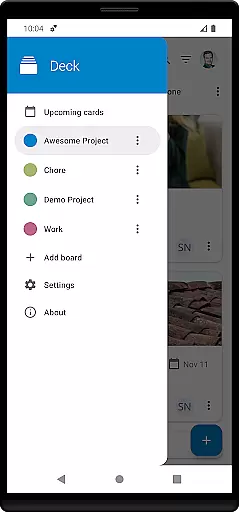
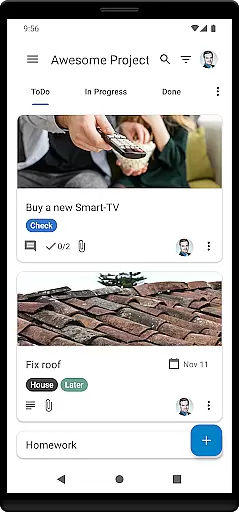
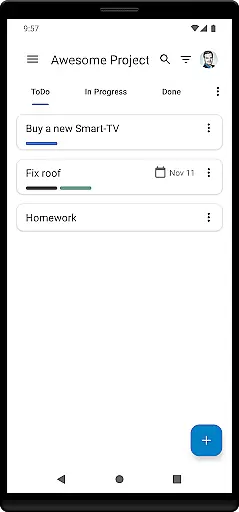
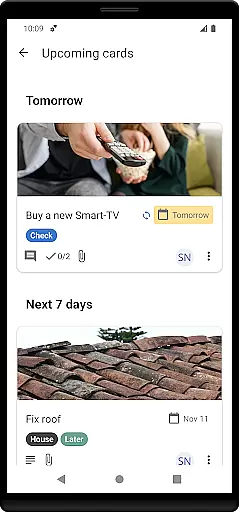

Nextcloud Deck is a productivity-focused application designed to streamline task management and team collaboration. This app allows users to create and organize tasks using cards, lists, and boards, making it an ideal tool for both personal and professional project management.
One of the standout features of Nextcloud Deck is its ability to work offline, ensuring that users can access and update their tasks even without an internet connection. Additionally, the app supports multiple accounts, enabling seamless integration across various Nextcloud instances. With functionalities such as tags, attachments, activities, and comments, Deck provides a comprehensive platform for managing complex projects efficiently.
The app also includes a dark mode and is available in multiple languages, enhancing user experience and accessibility. Whether you're coordinating with a team or organizing personal tasks, Nextcloud Deck offers a versatile solution tailored to enhance productivity.
Nextcloud Deck boasts a variety of features that cater to efficient task management and collaboration. The app supports multiple accounts, allowing users to manage different Nextcloud instances from a single interface. Its offline functionality ensures that users can continue working on their tasks regardless of internet availability.
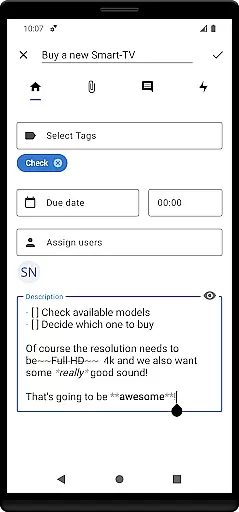
Deck's core revolves around managing cards, lists, and boards, which are essential for organizing tasks and projects effectively. Users can assign tags, attach files, track activities, and add comments to each card, providing a detailed overview of task progress and requirements. These features make it easier to keep track of deadlines and responsibilities within a team setting.
Additional highlights include a visually appealing dark mode and multilingual support, which collectively contribute to a more personalized and accessible user experience. By integrating seamlessly with the broader Nextcloud ecosystem, Nextcloud Deck stands out as a robust tool for enhancing productivity and collaboration.
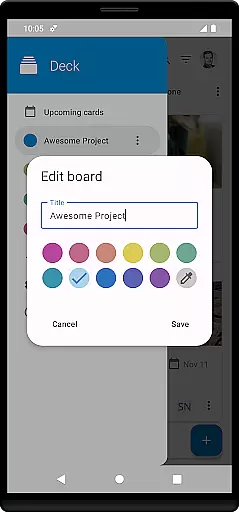
Nextcloud Deck offers a robust system for managing tasks through its card, list, and board structure. This feature allows users to organize their projects efficiently by creating customizable boards that represent different workflows or projects.
The app enables users to create and assign tasks with detailed descriptions, due dates, and priority levels. Each task is represented as a card that can be moved across lists such as To Do, In Progress, and Done, providing a visual representation of progress and task status.
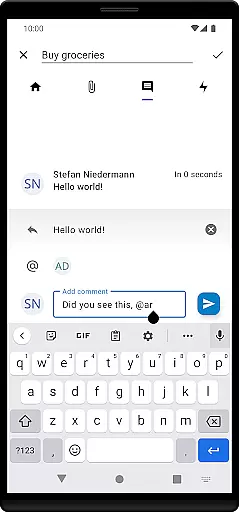
With support for tags, attachments, activities, and comments, the app ensures that all relevant information is accessible within each task card. This comprehensive approach enhances collaboration among team members who can easily track updates and communicate seamlessly.
Offline functionality guarantees uninterrupted productivity even without an internet connection. Users can make changes that will automatically sync once online, ensuring data integrity and consistency across devices.
Cross-device synchronization is a cornerstone of Nextcloud Deck's productivity enhancement capabilities. The app integrates seamlessly with Nextcloud, ensuring that any changes made on one device are instantly reflected across all others linked to the same account.
This synchronization extends beyond simple task updates; it includes attachments, comments, and activity logs. Such thoroughness ensures that every piece of information related to a project is always up-to-date and accessible from anywhere.
For users managing multiple accounts, Nextcloud Deck provides reliable synchronization for each account independently. This separation ensures there is no overlap or confusion between different workspaces, maintaining clear boundaries and enhancing focus.
Dark mode and multilingual support further enrich the user experience by offering personalized comfort settings. These features not only improve usability but also cater to individual preferences, making cross-device interactions more enjoyable and efficient.
User-friendly interface
Offline capabilities
Multiple account support
Comprehensive task management
Multilingual options
Requires Nextcloud setup
Limited standalone functionality
No built-in calendar
Dependent on third-party apps
Advanced features need technical know-how

Automates browsing any website and notifies you of important changes or events
 4.30
4.30
Protect and view your important info on your phone and tablet with eWallet®
4.80
⏰ Finally a timer app which can run multiple timers simultaneously on your watch
3.90
Activate Two Factor Authentication (2FA or Multi OTP), Password manager and more
4.10
The AI assistant that thinks with you - write, code, and solve complex tasks
4.60
* block pre-roll ads, pop-up and forced redirect ads * Samsung certification app
4.00
A beautiful digital clock with autostart and many other functions
4.70
Secure your apps with lock screens, use custom themes and different features.
4.40
Seamlessly read, manage, and organize all your PDF files solution in one place
4.40
Functional QR scanner and barcode reader that requires little storage space.
4.60
Lightweight PDF, Word, Excel reader.
4.60
Tally and goal counter for Wear OS & mobile
4.50
This small app MUST BE INSTALLED after purchase, else license won't work
4.40
Make apps & sites with natural language prompts
4.10
Customizable calendar widget for seamless event sync, planning & scheduling.
4.00


User Reviews