


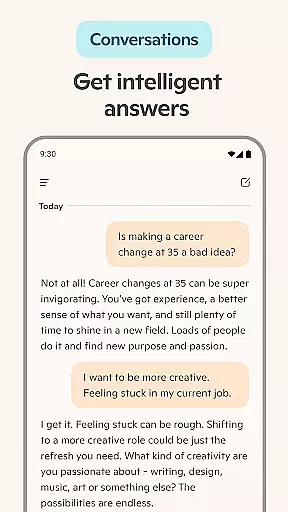
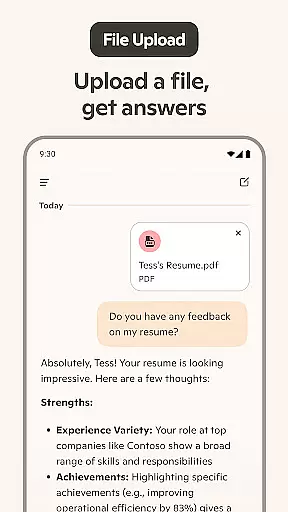
Microsoft Copilot is an advanced AI productivity tool designed to enhance your daily workflow. This powerful application combines the latest OpenAI and Microsoft AI models to deliver a comprehensive AI assistant experience. The app's core functionality revolves around its AI chat assistant, which can handle complex tasks such as writing, editing, research, and even generating images from text prompts.
One of the standout features is the integration of GPT-5 in "Smart" mode, offering users access to one of the most advanced AI models available. Whether you need help with professional writing projects, creating visual content, or managing everyday tasks like grocery lists, Copilot provides intuitive solutions that adapt to various needs. Its versatility makes it particularly valuable for professionals seeking to optimize their productivity.
The application's true value lies in its ability to simplify complex processes while maintaining high-quality outputs. From drafting business documents to generating creative visuals, Microsoft Copilot serves as a versatile digital companion that helps users achieve more in less time across both personal and professional contexts.
Microsoft Copilot distinguishes itself through several innovative features that cater to diverse productivity needs. The application's AI writing assistant offers comprehensive tools for composing professional documents, including emails, cover letters, and resume updates. Its multilingual capabilities enable seamless translation and proofreading across hundreds of languages, including regional dialects.
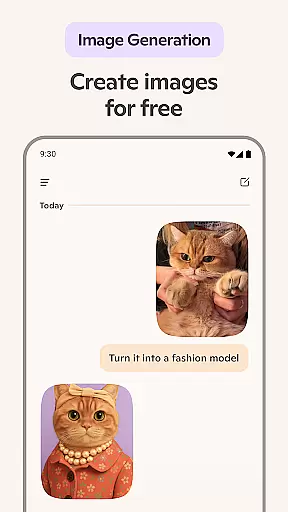
A key differentiator is the integrated AI photo generator, which transforms text prompts into high-quality visuals. This feature supports various creative applications, from logo design to children's book illustrations. The voice chat functionality adds another layer of convenience, allowing users to compose stories or generate visual concepts through spoken commands.
What sets Copilot apart is its unified approach to productivity, combining writing assistance, visual creation, and language processing in one platform. The application's ability to generate instant summaries, create shopping lists, and assist with meal planning demonstrates its versatility. These features collectively contribute to a significant boost in efficiency, making it an invaluable tool for modern professionals and creatives alike.
Task management is a cornerstone of productivity applications, and Microsoft Copilot excels in this area by offering users an AI-driven experience that simplifies complex activities. The app's core task management feature leverages the latest OpenAI and Microsoft AI models to provide summarized answers and straightforward solutions to multifaceted problems.
Microsoft Copilot enables users to efficiently organize their daily tasks. Whether it's drafting emails, creating shopping lists, or preparing weekly meal plans, the AI chat assistant delivers quick and intuitive support. This ensures that users can focus on their essential duties without getting bogged down by the intricacies of task management.
The true value of Microsoft Copilot's task management lies in its ability to integrate various productivity tools into one cohesive platform. Users can compose, edit, and research topics with ease, thanks to the app's powerful AI writing assistant. This holistic approach not only boosts productivity but also enhances the overall user experience by providing a seamless transition between different tasks and responsibilities.
Cross-device synchronization is vital for users who operate across multiple platforms and devices. Microsoft Copilot addresses this need by ensuring reliable and real-time updates across all user devices. This synchronization capability guarantees that whether you're working on your phone, tablet, or computer, your data and progress are always up-to-date.
The app employs smart AI technology to facilitate instant synchronization of user preferences, chat histories, and generated content such as images and text. This means that users can start a task on one device and continue on another without any loss of information or functionality. Such reliability is crucial for maintaining workflow continuity and efficiency.
Moreover, Microsoft Copilot's synchronization extends beyond mere data sharing. It encompasses the integration of AI-generated visuals and designs, allowing users to render concepts into stunning visuals from the abstract to the photorealistic across devices. This comprehensive cross-device support solidifies Microsoft Copilot's position as a robust tool for both personal and professional productivity environments.
Advanced AI models
Versatile productivity tools
Multilingual support
Integrated image generation
Voice command functionality
Requires stable internet
Premium features locked
Steep learning curve
Limited offline capabilities
Subscription costs

Experience real multitasking on your Android!
 4.00
4.00
Wake up & get tasks done! Add alarms & reminders on the Clock Launcher.
4.00
8 custom complications. Custom Time Fonts. Beautiful color schemes. A++ Design.
5.00
Make your handwriting beautiful, even more than pen on paper.
3.60
Todo reminder
4.10
Make apps & sites with natural language prompts
4.10
Great calculator for Android named one of USA TODAY's "25 Essential Apps".
4.90
A Pixel Art watchface inspired by other iconic 90s designs for Wear OS devices!
4.40
Quickly and easily keep track of your work shifts
4.70
App lock - lock apps with fingerprint, password, pin or pattern, protect privacy
4.70
Automates browsing any website and notifies you of important changes or events
4.30
Enjoy classic gameplay with customizable features and retro-style graphics.
4.30
All in One PDF Reader: Manage, Read and Edit your Documents
4.20
Device's storage information in a simple and clear graphical form (infographics)
4.10
Find and delete junk files & block unwanted notifications & manage files
3.70


User Reviews