
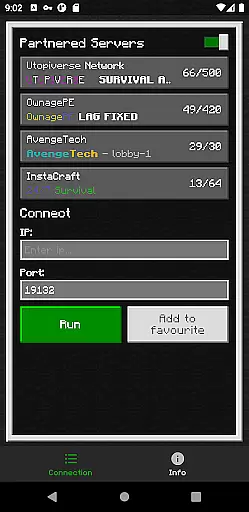
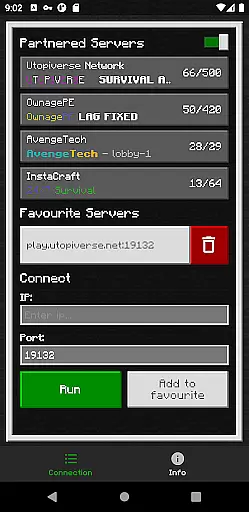
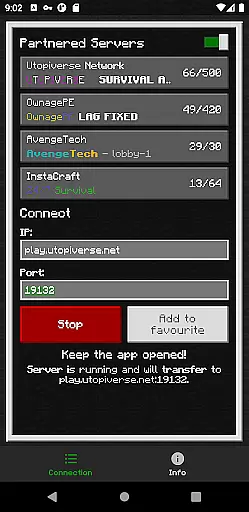
BedrockTogether (Pro) is an innovative tool designed to simplify the process of connecting to Bedrock Edition servers for Minecraft players. This ad-free version allows any Bedrock server to appear as a LAN server on Xbox or PlayStation clients, enabling straightforward connections without DNS rerouting. It's particularly useful for players seeking seamless access to multiplayer servers directly through their consoles.
The app facilitates easy connection by allowing users to input server IP and port details, then launching the game to find the server under the 'Friends' tab. Once connected, users can close the app, ensuring minimal interference with gameplay. While it doesn't support Realms or Nintendo Switch, its compatibility with major gaming consoles makes it a valuable tool for Minecraft enthusiasts.
BedrockTogether (Pro) offers several notable features that enhance the multiplayer experience for Minecraft Bedrock Edition players. Firstly, it eliminates the need for complex DNS rerouting by making servers visible as LAN options on supported consoles. This streamlined approach significantly reduces setup time and technical barriers.
Additionally, the app provides a simple interface where users can enter server details and initiate connections effortlessly. Its compatibility with Xbox and PlayStation platforms ensures broad accessibility. Although it currently lacks support for Realms and Nintendo Switch, the app's ability to connect players quickly and efficiently underscores its utility in the Minecraft community.
BedrockTogether (Pro) delivers exceptional core functionality by enabling seamless LAN server connections for Minecraft Bedrock Edition users. The app allows Xbox and PlayStation clients to connect effortlessly to any Bedrock Edition server without the need for complex DNS rerouting.
The application's effectiveness is demonstrated through its straightforward operational process. Users simply input their desired server IP and port, click the 'Run' button, and navigate to the 'Friends' tab in-game to establish a connection via the LAN option. This streamlined approach ensures that even novice users can successfully operate the app.
By eliminating the need for third-party DNS services, BedrockTogether (Pro) provides a more reliable and direct connection method. The app's ability to maintain stable connections while gaming consoles and mobile devices are on the same LAN network showcases its technical precision.
This ad-free version offers uninterrupted functionality, allowing users to focus solely on their gaming experience without intrusive advertisements or distractions, thereby enhancing overall user satisfaction and performance.
The interface design of BedrockTogether (Pro) emphasizes simplicity and intuitive operation, ensuring users can quickly understand and utilize its features. The main screen presents only essential elements - server IP, port fields, and a prominent 'Run' button - creating an uncluttered and focused user experience.
Each operational step is carefully considered for ease of use. The four-step connection process is presented in a clear, linear fashion that guides users naturally through the setup procedure. This logical flow minimizes potential confusion and reduces the learning curve for new users.
Error prevention is built into the interface through careful placement of input fields and clear labeling. The app's troubleshooting section provides straightforward network verification steps, helping users quickly identify and resolve common connectivity issues.
While maintaining professional functionality, the interface avoids unnecessary complexity. The absence of advanced settings or complicated configurations makes the application accessible to users of all technical skill levels, from casual gamers to experienced server administrators.
User-friendly interface
Fast server connection
Eliminates DNS rerouting
Supports major consoles
Ad-free experience
No Nintendo Switch support
Limited to Bedrock Edition
Realms not supported
Requires same LAN network
Third-party application

 4.50
4.50
HD Camera captures every special moment.
4.60
Complete kernel toolbox with features to manage and tweak your rooted device
4.30
FV File Manager Pro, Fast and powerful file manager for Android
4.60
Fluid navigation gestures for all of us!
4.30
Powerful collection of electronics tools and reference.A must for any enthusiast
4.90
The ultimate tool for network analysis, wifi scanning and problem detection.
4.90
NFC Tools can read and write NFC tags.
4.70
Screen recorder with audio to record high-quality videos and take screenshots.
4.40
Easily install aab(Android App Bundle) files on your Android device with our app
4.80
The Ultimate Flex Drivers Utility App - Convenient Tapping & Block Filters
4.70
Play your X-Box games remotely in 1080p with any controller and zero latency
4.60
eXtended Permission Manager - a small app to manage permissions and AppOps
4.50
Just swipe the edge to do something!
4.40
Fun lie-detection pranks for friends and parties.
3.80


User Reviews