

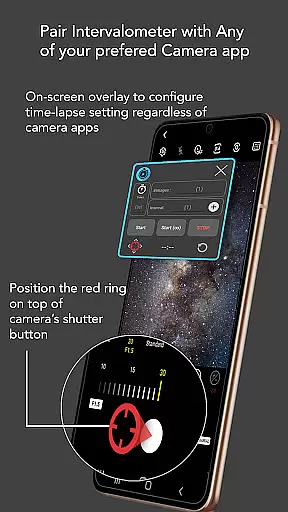
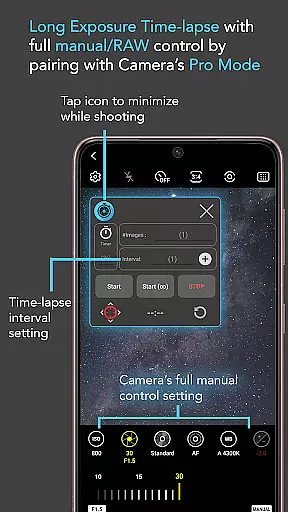
Intervalometer for TimeLapse is a powerful photography tool designed to automate the process of capturing time-lapse sequences. This app allows photographers to configure specific time intervals to trigger the camera shutter, working seamlessly with any camera app on Android devices running version 7 and above.
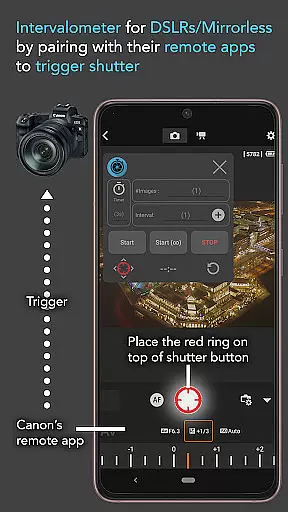
The application's key strength lies in its versatility. It supports various specialized camera modes including HDR, night mode, manual settings, and more, enabling users to create stunning low-light, long exposure, and even Holy Grail time-lapses that transition from day to night. Additionally, it can be paired with dedicated camera remote apps from leading brands like Canon, Sony, and Nikon, effectively turning your smartphone into a sophisticated intervalometer device.
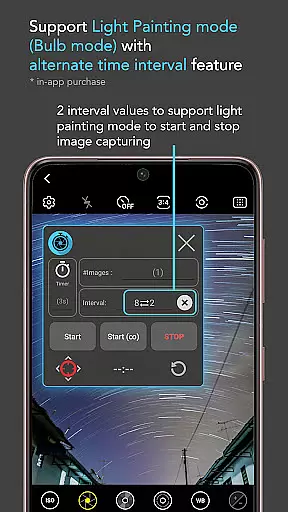
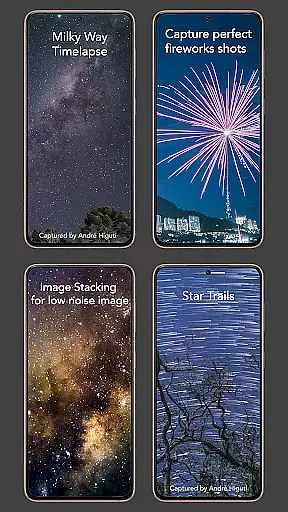
Whether you're capturing star trails, light painting scenes, or ultra-wide landscapes, Intervalometer for TimeLapse provides the control and flexibility needed to produce professional-quality time-lapse videos. Its ability to work with different camera modes ensures that users can achieve their desired visual effects while maintaining full creative control over exposure settings and formats.
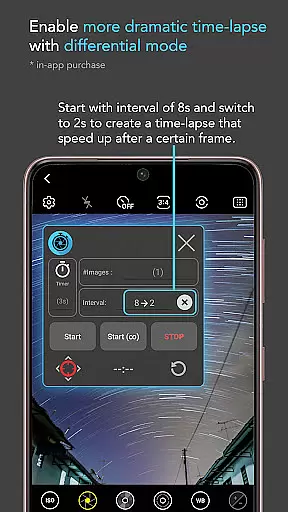
Intervalometer for TimeLapse offers an impressive array of features tailored for both amateur and professional photographers. One of its standout capabilities is the full control it provides over time-lapse configurations. Users can customize delay timers, interval times, and the number of shots, ensuring precision and adaptability for various shooting scenarios.
In addition to standard time-lapse functionality, the app includes advanced modes such as Infinite Mode and Bulb Mode. These features allow for extended exposure times and continuous shooting, which are essential for capturing complex scenes like star trails or lightning strikes. The app's compatibility with any camera app further enhances its utility, as photographers can easily reconfigure the shutter button position to suit their preferred camera interface.
Moreover, Intervalometer's support for image stacking opens up new possibilities for post-processing. By capturing multiple frames for later combination, users can achieve higher quality images with reduced noise and enhanced detail. This makes the app not only suitable for creating dynamic time-lapse videos but also valuable for techniques like astrophotography and landscape photography where image quality is paramount.
Real-time capture and preview functionality is essential for ensuring that every moment of your time-lapse photography is captured as intended. Intervalometer for TimeLapse offers this by integrating seamlessly with any camera app, allowing users to configure and trigger the camera shutter at desired intervals.
This app leverages the AccessibilityService API to automate the process of shutter triggering, which means it can work across different camera modes including HDR, night mode, and more. This ensures that users have the flexibility to experiment with various exposure settings and camera modes while maintaining the continuity of their time-lapse sequences.
For photographers looking to capture complex scenes such as star trails or light painting, the ability to preview and adjust settings in real-time is invaluable. Intervalometer provides this control, enabling creators to fine-tune their configurations and achieve professional-quality results without needing specialized equipment.
Ultimately, the real-time capture and preview feature empowers users to execute their creative vision with precision, making it an indispensable tool for both amateur and professional time-lapse photographers.
While Intervalometer for TimeLapse does not focus on AI beauty or enhancement features, its core functionality indirectly contributes to the naturalness and quality of the final output. By automating the photo-taking process, it allows photographers to concentrate on the artistic aspects of their work rather than the technicalities of shutter release.
The app's ability to work with dedicated camera remote apps from brands like Canon, Sony, and Nikon adds another layer of authenticity to the images captured. This compatibility ensures that each frame is taken with precision timing, which is crucial for creating smooth and natural time-lapse videos.
Moreover, Intervalometer supports advanced time-lapse techniques such as low light, long exposure, and HDR time-lapse. These capabilities allow photographers to capture scenes in their truest form, preserving the natural beauty of the environment without artificial enhancements.
In summary, although Intervalometer may not offer traditional AI beauty features, its precise control over time-lapse configurations results in naturally stunning and high-quality imagery, elevating the overall photographic experience.
User-friendly interface
Wide compatibility
Customizable settings
Supports advanced modes
Enhances creative control
Requires compatible device
May need device restart
Limited to photo automation
No built-in camera app
Depends on other apps

AI portrait generator and polaroid AI selfie, fun AI generated AI photo creator!
 4.30
4.30
Photo Album Watch Face shows your favorite pictures as a Watchface.
1.90
Create funny photos and videos with the popular Time Warp Scan filter.
4.90
Photo prints, cards, & gifts at Walgreens. Easy ordering & fast local pickup !
4.80
Raw Image Viewer. Gallery with support of raw images (.cr3, .cr2, .nef, .raf).
2.00
Luminar: Photo Editor - easy picture editing with AI
4.20
Professional quality photo edits with the new Snapseed.
4.00
Hair color changer, AI haircut app, fun hair editor and buzz cut filter for all!
3.80
Unlock the full potential of your DJI drone with Litchi
4.50
Cartoon and artistic effects for your photos and videos
4.70
Add Watermark - Sign your pictures with a text or logo. Effective, quick, easy!
4.50
AI photo editor with hair editor, retouch tools, hair color changer & filters!
4.50
AI photo enhancer with Sora 2! Enhance, descratch, and colorize your old photos.
4.50
Future baby face generator: AI kids generator, kid face! What my baby look like?
4.40
What celebrity do you look like? Celebs will find your celebrity match!
4.10


User Reviews