
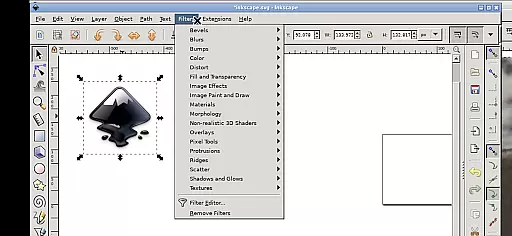
Inky is a powerful vector graphics editor tailored for Android devices, bringing the full functionality of Inkscape to mobile platforms. This app allows users to create professional-grade vector images in SVG format while supporting various other file types for import and export.
The application excels in rendering primitive shapes, text, gradients, and patterns with adjustable transparency. It also supports raster graphic embedding and tracing, making it versatile for both digital art creation and photo-based projects. With intuitive touch controls optimized for tablets and stylus input, Inky ensures precise manipulation of objects through zooming, panning, and transforming actions.
Inky stands out with its comprehensive set of design tools that cater to both beginners and professionals. The app supports creating and editing vector shapes like rectangles, ellipses, polygons, and spirals, along with advanced features such as gradient fills and stroke adjustments.
One notable feature is its seamless integration with Android's file system, allowing direct access to Documents and Pictures without cumbersome imports or exports. Additionally, the app provides flexible navigation options including pinch-to-zoom, two-finger scrolling, and customizable desktop scaling via Android notifications. These capabilities ensure an efficient workflow whether you're using a phone or tablet.
Inky offers a comprehensive suite of creative tools that cater to both professional designers and hobbyists. The app provides full-featured vector graphics editing capabilities, enabling users to create intricate designs with ease.
With support for primitive vector shapes such as rectangles, ellipses, polygons, arcs, spirals, stars, and 3D boxes, Inky allows for versatile design options. Users can fill these objects with solid colors, patterns, or gradients and adjust transparency levels for unique visual effects.
The ability to embed and trace raster graphics means that users can transform existing images into scalable vector formats. This feature is particularly useful for creating vector graphics from photos and other raster sources, expanding the creative possibilities.
Moreover, Inky's manipulation tools, including moving, rotating, scaling, and skewing, provide precise control over design elements. These robust features ensure that users have all the necessary tools at their fingertips to bring their artistic visions to life.
Inky stands out in its canvas and format flexibility, allowing creators to work without constraints. The app supports Scalable Vector Graphics (SVG) format, which is essential for producing high-quality vector images that maintain clarity at any scale.
Beyond SVG, Inky facilitates the import and export of various other formats, ensuring compatibility with different workflows and requirements. This versatility enables seamless integration with other design tools and platforms.
Users will find practical links within the home directory to access files across Android devices, eliminating the need for cumbersome file imports or exports. This streamlined approach enhances productivity by providing direct access to Documents, Pictures, and more.
Whether working on detailed illustrations or simple graphics, Inky's adaptable canvas size and format options empower users to customize their workspace according to specific project needs, thus optimizing the creative process.
User-friendly interface
Extensive file format support
Powerful design tools
Seamless Android integration
Open-source flexibility
Steep learning curve
Performance on older devices
Limited right-click options
No native cloud sync
Complex settings navigation

Premium version of Shimeji-ee app with no ads & no limit active shimeji
 4.0
4.0
Learn how to draw with step-by-step tutorials, fun lessons & multiplayer drawing
4.70
Image/ Text to Video Generator
4.40
Castle is social media for creating and playing games!
4.60
Get an overview over all your embroidery threads, projects and more.
4.60
Bring One UI 8.5 Icons to life -elegant dark icons with a modern, premium touch.
4.30
Share the joy of painting with ibis Paint! Drawing anime and manga art.
4.50
Just trace a projected picture on paper and color! Draw & Paint with AR drawing
4.40
An intuitive, high-performance painting app that lets you focus on creating
4.40
Image resizer to resize, crop, rotate, flip, change dpi photo or picture in bulk
4.60
Everything you need to create hand drawn animation, anywhere you go!
4.40
AR Anime Drawing: How to draw anime with AR drawing & sketching apps!
4.00
Sketch and paint on your device with the feel and freedom of drawing on paper
4.00
Art of Combination Wear OS Watch faces (for Wear OS 5+ devices)
3.90
Powerful home decoration & house design that allows you to design dream home.
3.80


User Reviews