


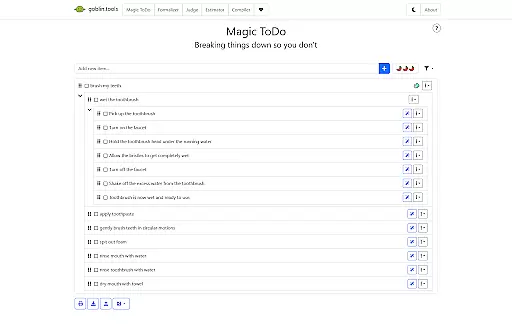
Goblin Tools is a productivity app designed to simplify everyday tasks through a collection of small, intuitive tools. It offers solutions for task management, text analysis, decision-making, and more. The app is especially helpful for neurodivergent individuals, providing clever helpers that address challenges faced by those with ADHD, autism, and executive dysfunction.
With features like Magic ToDo for breaking tasks into manageable steps, Formalizer for tone adjustment in text, and Chef for creating recipes from available ingredients, Goblin Tools delivers practical value. Whether you're managing complex projects or need assistance with daily activities, this app helps streamline processes while maintaining an ad-free experience.
The app's feature set is both diverse and specialized, catering to various productivity needs. Magic ToDo allows users to deconstruct overwhelming tasks into smaller, achievable actions. Formalizer provides instant rewording of text to match the appropriate tone, while Judge analyzes the emotion behind messages. Professor simplifies complex information for better understanding.
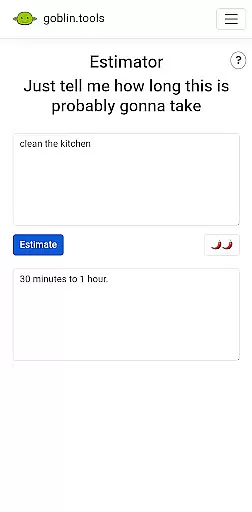
Additional tools include Consultant for decision support, Estimator for activity time predictions, Compiler for organizing thoughts into actionable plans, and Chef for culinary creativity. Each feature is crafted to provide tangible benefits, particularly for neurodivergent users who appreciate straightforward, functional design in their digital tools.
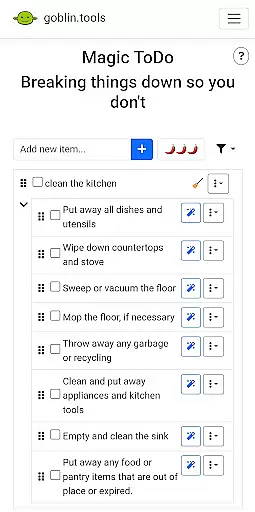
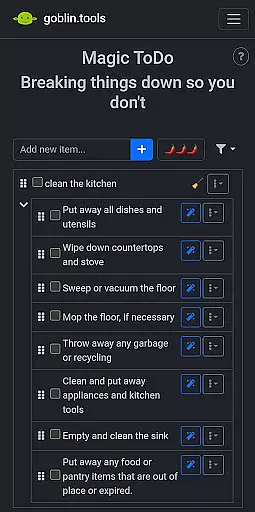
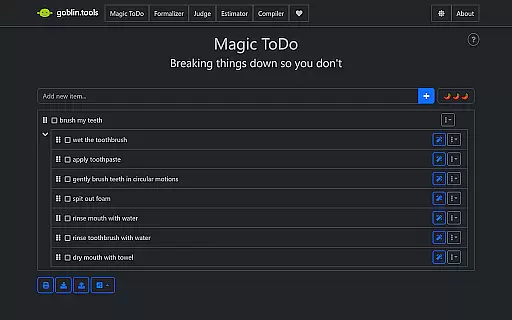
Task management is essential for productivity, especially when dealing with complex projects or daily routines. Goblin Tools excels in this area by offering Magic ToDo, a feature that allows users to break down any task into manageable steps.
This app understands the challenges faced by neurodivergent individuals and provides clever tools like Compiler, which helps organize thoughts and brain-dumps into actionable items. By simplifying overwhelming tasks, it empowers users to take control of their workload efficiently.
With features such as Estimator for providing rough time estimates and Consultant for aiding in decision-making, Goblin Tools ensures that users can prioritize effectively and allocate their time wisely. These capabilities are particularly beneficial for those managing ADHD, autism, or executive dysfunction.
The practicality of Goblin Tools extends beyond just listing tasks; it equips users with the means to execute them successfully. This results in improved focus, better organization, and ultimately increased productivity without feeling overwhelmed.
In today's interconnected world, having reliable cross-device synchronization is crucial for maintaining workflow continuity. While specific details about Goblin Tools' syncing capabilities aren't provided, its design suggests an intuitive approach to keeping data consistent across devices.
For users who switch between different gadgets throughout their day, knowing that their information is updated and accessible wherever they go is invaluable. Although Goblin Tools emphasizes simplicity and utility over technical specs, one could infer that its clever helpers maintain state coherence seamlessly.
Features like Formalizer and Judge enhance communication but would be less effective if not synced reliably across all user devices. Therefore, ensuring these tools work harmoniously on every platform is likely a priority for the developers behind Goblin Tools.
By focusing on untangling neurospicy challenges while potentially offering stable synchronization, Goblin Tools supports uninterrupted productivity. Users can rely on having their personalized settings and progress available at all times, thus enhancing both convenience and efficiency.
User-friendly interface
Task simplification
Emotion analysis
Recipe generation
Ad-free experience
Limited advanced features
No offline functionality
Small user base
Basic design
Few customization options

QuickBooks Workforce lets teams view pay info and track time in one place.
 4.70
4.70
Create study competitions, track your hours, and stay consistent with friends
4.4
All in one sketching tool. Technical and General drawing. Online Maps support.
3.70
Wake up & get tasks done! Add alarms & reminders on the Clock Launcher.
4.00
Enjoy classic gameplay with customizable features and retro-style graphics.
4.30
Calendar 2023 widget for Android. Appointment scheduler, planner, and reminder
4.60
This small app MUST BE INSTALLED after purchase, else license won't work
4.40
Intelligent AI Assistant
4.10
Set up, print, and get support—in one place
4.20
Seamlessly integrate data and reports to build your presentation to impress
4.80
Protect and view your important info on your phone and tablet with eWallet®
4.80
Customizable calendar widget for seamless event sync, planning & scheduling.
4.00
Mega cloud explorer plugin for Solid Explorer
3.80
Code on-the-go with VScode for Android. Edit,debug and collaborate from mobile!!
3.10
The upgraded version of Name Wheel with AI and the power to add your own wheels.
4.2


User Reviews