
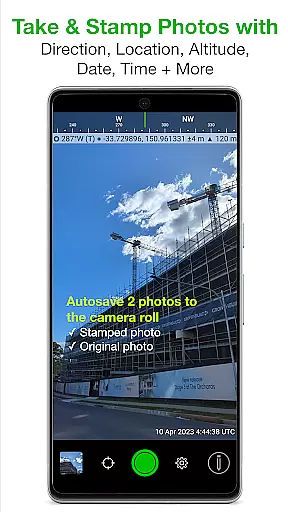
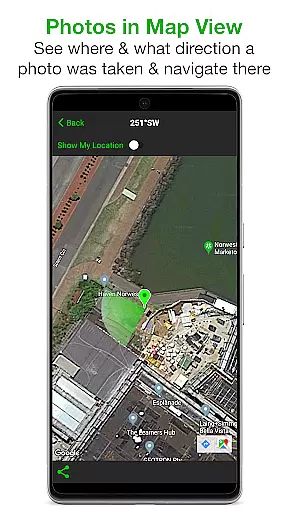
Solocator is a professional GPS camera app designed for fieldwork and photo documentation across various industries. It allows users to overlay and stamp photos with critical metadata including location, direction, altitude, date, and time. With the optional Industry Pack, users can capture additional field notes such as project names and descriptions.
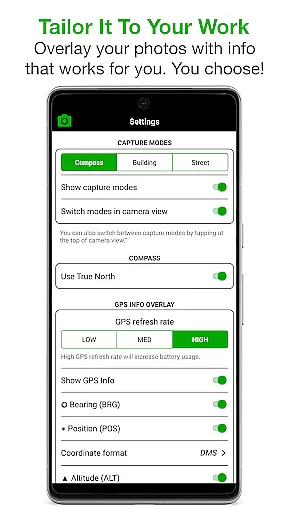
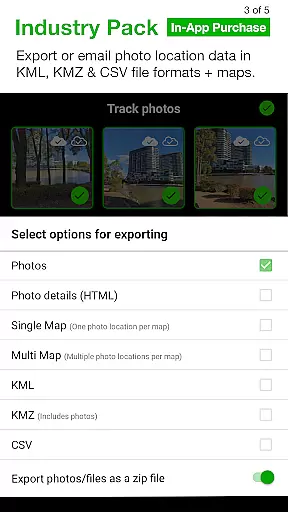
The app offers extensive customization options for overlay information, supporting different coordinate formats, units of measurement, and even street addresses. Solocator's autosave feature stores both stamped and original photos, while its advanced sharing capabilities allow exporting data in multiple formats like KML, KMZ, and CSV. These features make it an essential tool for professionals who need accurate and detailed photo documentation.
Solocator stands out with its comprehensive set of features tailored for professional use. The app provides multiple overlay options, allowing users to select from various data points such as GPS position, compass direction, altitude, tilt, and roll angles. The Industry Pack extends these capabilities with UTM/MGRS coordinates, street address display, and customizable note fields.
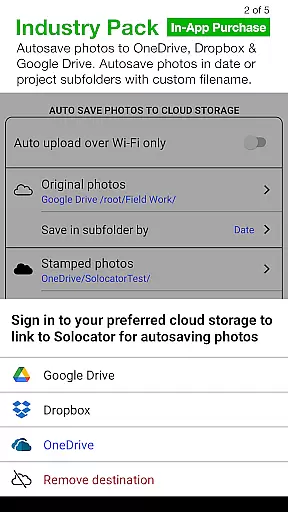
One of the key innovations is the autosave functionality that simultaneously saves both stamped and original images. The app also supports cloud storage integration with services like Google Drive and Dropbox. Additionally, Solocator enables batch editing of photo metadata and offers advanced export options including custom filename structures and multiple file format support. These features significantly enhance workflow efficiency for field professionals.
Real-time capture and preview functionality is essential for photography applications like Solocator. This feature ensures that users can instantly see the results of their shots with all selected overlays applied before taking the photo.
Solocator excels in this area by providing a comprehensive set of camera controls alongside real-time overlays. Users can view GPS position, compass direction, altitude, tilt, roll angles, and more directly on the camera screen. The app supports both back and front cameras, pinch zoom, self-timer, flash, and exposure adjustments, ensuring maximum flexibility during fieldwork.
The value of real-time capture and preview lies in its ability to save time and improve accuracy. By seeing all necessary information overlaid on the live camera feed, users can ensure that each photo contains the required data without needing to retake shots. This is particularly beneficial for professionals who rely on precise documentation, such as construction site managers or environmental surveyors.
Moreover, Solocator's autosave feature allows users to capture two versions of each photo simultaneously: one with overlays for documentation purposes and another clean version for other uses. This dual-capture capability enhances workflow efficiency and provides peace of mind knowing that all critical information is accurately recorded.
While Solocator is primarily designed for professional photo documentation rather than aesthetic enhancements, it incorporates features that contribute to image quality and natural enhancement. The app focuses on maintaining the authenticity of captured data while providing options for subtle improvements.
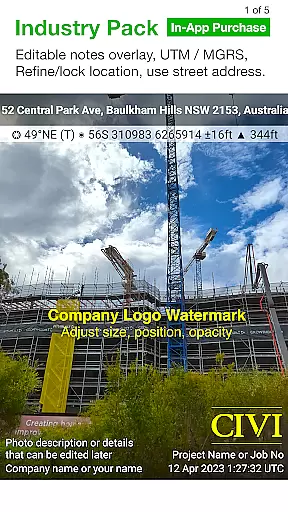
The Industry Pack offers advanced features like UTM/MGRS coordinate formats, street address display, and customizable export filenames. These features enhance the overall usability of photos without compromising their evidentiary value. Additionally, the app's ability to refine and lock GPS locations helps improve location accuracy, especially in challenging environments near buildings.
For users requiring more traditional enhancement features, Solocator provides basic editing capabilities through its overlay system. The editable notes overlay allows adding project names, descriptions, and watermarks, which can serve as professional branding elements rather than artificial beautification.
The true value of Solocator's enhancement approach lies in its commitment to maintaining data integrity while offering practical tools for professional use. Rather than focusing on artificial beauty enhancements, the application emphasizes accurate data capture and presentation, making it an indispensable tool for industries where photographic evidence must be both informative and reliable.
Comprehensive metadata overlay
Customizable export options
Batch editing capability
Cloud storage integration
Cross-platform compatibility
Paid Industry Pack
Complex for casual users
Requires learning curve
Some features need compass
Occasional GPS inaccuracies

A collection of tools and reference tables for DPs, ACs, DITs and Operators.
 4.70
4.70
Search, tag and rate your way to an organized image gallery
4.40
AI photo editor with hair editor, retouch tools, hair color changer & filters!
4.50
HD Camera Pro with HD Video shooting, Panorama, Photo editor , Beauty Camera.
4.50
A must-have app for landscape photographers
4.60
Easily view, share, delete photos with Gallery.
4.70
AI-powered video creator by MiniMax - Where ideas meet cinema
4.20
Snap photos remotely using your Garmin watch as the camera trigger
4.5
The original Rarevision VHS look seen everywhere!
4.70
Gallery show photo, video, slideshow, is perfect 3D effect private photo albums.
4.80
1M influencer's special filter
4.60
Enhance, retouch & create your story - Share the moment with Photoshop Express.
4.60
Gallery Slideshow is slideshow maker app for slideshow from your gallery photos.
3.90
Hair color changer, AI haircut app, fun hair editor and buzz cut filter for all!
3.80
Photo Album Watch Face shows your favorite pictures as a Watchface.
1.90


User Reviews