
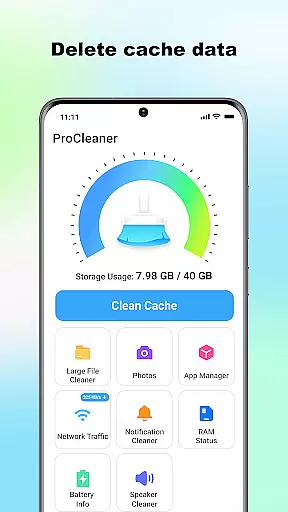
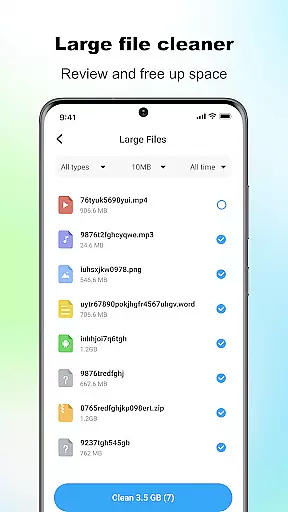
ProCleaner is a comprehensive device optimization tool designed to help users efficiently manage their smartphone storage. The app's core functionality revolves around scanning and cleaning cache files, removing residual and junk files, and identifying large files for better storage management.
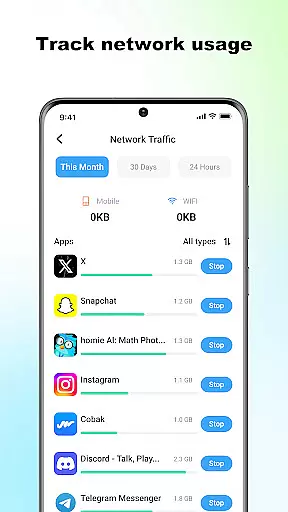
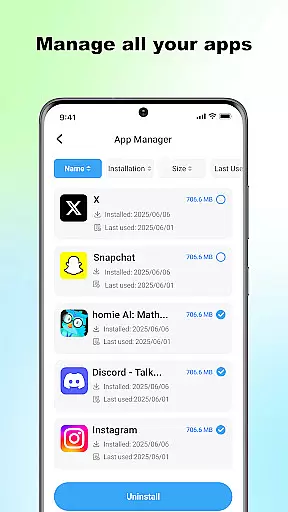
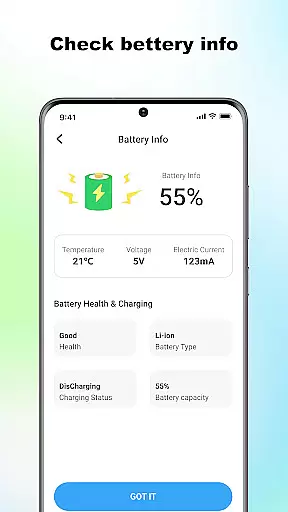
In addition to its storage optimization features, ProCleaner offers advanced capabilities such as batch application uninstallation, network speed monitoring, and battery status checking. These features make it an all-in-one solution for maintaining optimal device performance.
The app is particularly useful for users who frequently encounter storage issues or want to keep their devices running smoothly. By providing local file management without collecting personal data, ProCleaner ensures both efficiency and privacy in its operations.
ProCleaner stands out with its diverse range of practical features that cater to various device maintenance needs. The app employs advanced scanning algorithms to detect and clean different types of unnecessary files, including cache, residual, and junk files.
One of the app's notable characteristics is its ability to handle multiple tasks simultaneously. Users can uninstall several applications at once, monitor their network speed in real-time, and check battery consumption patterns. This multi-functional approach saves time and enhances user convenience.
The technical implementation requires storage access for file scanning and app usage permission for managing installed applications. However, all operations are performed locally on the device, ensuring that no personal files or data are collected or uploaded to external servers.
ProCleaner excels in delivering accurate and effective core functions that are essential for device optimization. The app thoroughly scans your device to identify cache files, residual data, and junk files that can be safely removed. This ensures that unnecessary files do not occupy valuable storage space.
In addition to cleaning capabilities, the app provides tools to manage large files efficiently. Users can easily locate and review large files, helping them make informed decisions about which files to keep or delete. The multiple application uninstall feature further enhances its utility by allowing users to remove unwanted apps in bulk.
The network speed monitoring and battery status checking features add another layer of functionality, ensuring users have a comprehensive set of tools to maintain their device's performance. These features collectively contribute to an optimized and streamlined user experience.
A simple and intuitive interface is crucial for any tool-based application, and ProCleaner delivers on this front. The design prioritizes ease of use, ensuring that even users with limited technical knowledge can navigate and utilize the app effectively. Clear labels and straightforward menus guide users through each function seamlessly.
Each core feature is easily accessible from the main dashboard, minimizing the learning curve typically associated with multifunctional apps. Visual indicators and progress bars provide real-time feedback during scanning and cleaning processes, keeping users informed every step of the way.
By focusing on interface simplicity, ProCleaner ensures that users can quickly perform necessary tasks without frustration. This approach not only enhances user satisfaction but also encourages regular use, leading to better device maintenance and performance over time.
Comprehensive cleaning tools
Batch app uninstallation
Real-time network monitoring
Battery status tracking
Local data processing
Requires storage access
App usage permission needed
Limited to local operations
No cloud backup option
Basic UI design

Extremely fast, secure, and protects your privacy
 4.80
4.80
PDF Reader - Document Viewer: Read, Manage & Organize Your Documents
3.10
App to pay for FUTO Keyboard
4.60
A non-root local ADB shell client. READ BELOW!
3.40
Undelete and recover your lost or deleted files with DiskDigger!
3.40
Quickly check the frequency of the Earth
4.30
Mirror your screen to Fire TV - Super fast and simple
4.40
NFC Tools can read and write NFC tags.
4.70
Mobile Security with Scam Protection | Malware & Virus Cleaner | Safe Browser
4.70
Enjoy smooth gameplay with Game Booster
4.90
Use your phone as a webcam on your computer over WiFi or USB.
4.40
Forza Tuning Calculator App for Forza Horizon 5, Motorsport and Earlier Titles
4.40
Pro Emulator is an easy to use game console emulator for a range of consoles.
4.40
Just one-tap to easy translate in any language after calls within seconds.
4.20
Fun lie-detection pranks for friends and parties.
3.80


User Reviews