
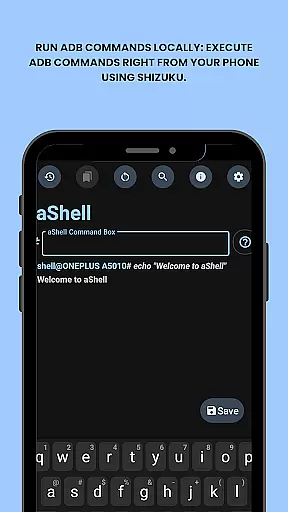
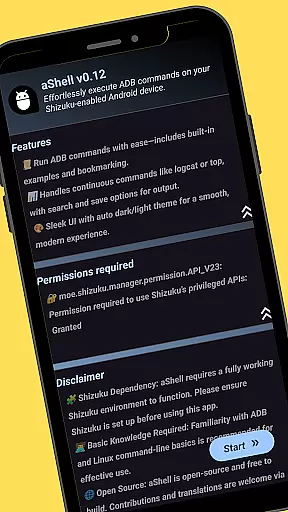
aShell is a lightweight, open-source ADB shell designed for Android devices running Shizuku. It allows users to execute ADB commands directly from their phone without the need for a PC. This app is ideal for developers, power users, and enthusiasts who seek full control over their device's internals.
With features like live command output, search within output, saving output to file, dark/light mode support, and bookmarking frequently used commands, aShell provides a comprehensive toolset for managing Android devices efficiently. Its dependency on Shizuku and recommendation for basic ADB knowledge make it particularly suitable for advanced users familiar with these technologies.
aShell offers several key features that enhance its functionality as an ADB shell tool. Users can run ADB commands locally on their Android device using Shizuku, providing direct access to system operations without needing a computer.
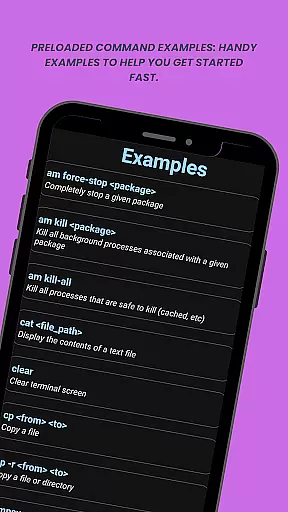
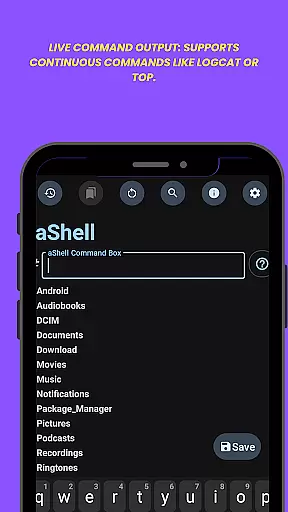
The app includes preloaded command examples to help users get started quickly and supports continuous commands such as logcat or top. Additionally, it allows searching within command output, saving outputs to .txt files for future reference or sharing, adapting to dark/light modes based on system settings, and bookmarking frequently used commands for easy access.
These features collectively enable efficient management of Android devices by offering powerful tools in a user-friendly interface tailored for both novice and experienced users alike.
aShell is designed to execute ADB commands directly from an Android device, offering a streamlined and effective solution for developers and power users. The app leverages the Shizuku environment to ensure that all operations are performed accurately and efficiently without requiring a PC.
With preloaded command examples and live command output support, aShell enhances usability by providing continuous feedback for commands like logcat or top. This ensures that users can monitor processes in real-time, making troubleshooting and system monitoring more intuitive and reliable.
The ability to save command outputs to a file adds another layer of practicality, allowing users to store important data for future reference or sharing. This feature underscores the app's commitment to delivering precise and actionable results, which is crucial for effective device management.
aShell offers a user-friendly interface that simplifies the complex task of executing ADB commands on mobile devices. By integrating seamlessly with the Shizuku environment, it removes barriers typically associated with command-line operations, making the process accessible even to those with basic ADB knowledge.
The inclusion of dark and light mode support demonstrates a focus on user comfort and adaptability, ensuring that the app remains visually comfortable regardless of the system theme. This attention to detail enhances the overall user experience, making prolonged use less straining on the eyes.
Additionally, features like bookmarking frequently used commands and searching within command outputs contribute to the app's intuitive design. These elements collectively reduce the learning curve and streamline navigation, empowering users to perform tasks with greater ease and efficiency.
User-friendly interface
Comprehensive feature set
Efficient command execution
Supports Shizuku environment
Open-source availability
Requires Shizuku setup
Limited to tech-savvy users
No standalone functionality
Dependent on external resources
Potential learning curve

 4.50
4.50
Easily install aab(Android App Bundle) files on your Android device with our app
4.80
PDF Reader - Document Viewer: Read, Manage & Organize Your Documents
3.10
Unit and currency converter with easy and simple UI.
4.80
Universal TV remote control all TVs, Roku, LG, Samsung, Fire, Vizio, Sony, TCL.
4.40
Canon PRINT is a companion app for your Canon printer.
4.60
WiFi Signal Strength Meter help you detect WiFi Signal Strength in real time.
4.80
NFC Tools can read and write NFC tags.
4.70
Fun lie-detection pranks for friends and parties.
3.80
HD Camera captures every special moment.
4.60
HD Video player and downloader for all formats, fast & smooth 4K video playback.
4.60
Pro Emulator is an easy to use game console emulator for a range of consoles.
4.40
Fluid navigation gestures for all of us!
4.30
Family Locator, Share location, StayConnect with your family in real time
3.90
Unleash gamepad precision for ultimate mobile gaming dominance.
3.90


User Reviews