
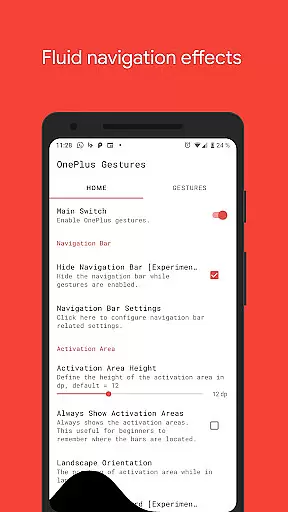
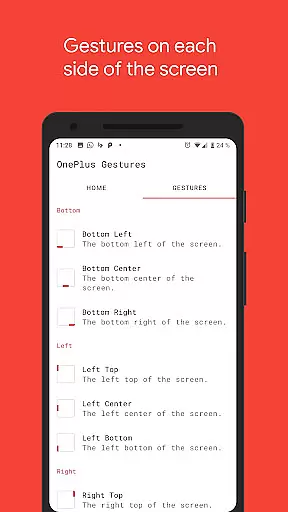
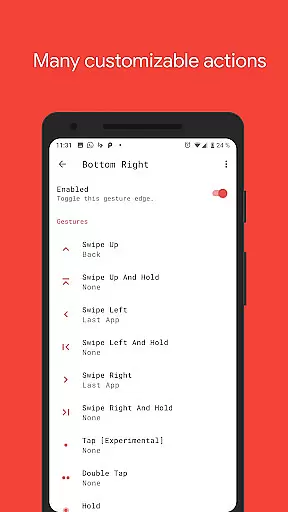
Vivid Navigation Gestures is a powerful tool that revolutionizes the way you interact with your Android device. This app allows users to control their devices through intuitive gestures, eliminating the need for traditional button presses. With compatibility across various Android versions and devices, it brings the next-generation navigation experience to everyone.
The application stands out with its fluid visual effects during gesture operations and multiple trigger points across the screen. Whether you want to launch Google Assistant, toggle split-screen mode, or take a screenshot, Vivid Navigation Gestures provides a seamless alternative to conventional navigation methods. Its ability to hide the stock navigation bar (with ADB or Root) further enhances the full-screen experience, making it an essential tool for power users seeking efficiency and aesthetics.
One of the key highlights of Vivid Navigation Gestures is its extensive range of customizable gestures. Users can perform actions such as swiping up, double-tapping, or holding specific areas on the screen to execute commands like going back, opening recent apps, or controlling media playback. The app supports over 15 unique gestures, each of which can be mapped to more than 20 available actions.
In addition to its rich functionality, the app integrates accessibility services to simulate system-level actions such as navigating home or opening quick settings. It also ensures privacy by not collecting any data via these services. For advanced users, features like hiding the navigation bar using ADB commands provide even greater flexibility. Overall, Vivid Navigation Gestures combines versatility, performance, and innovation to deliver an unmatched user experience.
Gestures have become an essential part of modern mobile interaction, and Vivid Navigation Gestures excels in this domain. The app allows users to control their Android device through intuitive gestures instead of traditional button presses, offering a seamless experience that feels natural and responsive.
With multiple gesture triggers available across different screen areas, the app ensures precision and effectiveness. Whether swiping from the bottom left or tapping the right center, each gesture is accurately registered and translated into specific actions. This level of responsiveness enhances user productivity and streamlines navigation.
The app also supports a wide range of actions, from launching Google Assistant to toggling split-screen mode. Each action is executed with minimal latency, ensuring that users can rely on the app for both basic and advanced tasks. This versatility makes Vivid Navigation Gestures a powerful tool for those looking to maximize their device's potential.
A well-designed interface is crucial for any tool-based application, and Vivid Navigation Gestures delivers simplicity without compromising functionality. The app features an intuitive setup process that guides users through configuring their preferred gestures and corresponding actions.
Despite its powerful capabilities, the app maintains a clean and straightforward interface. Users can easily navigate through settings to customize gestures according to their preferences. Visual indicators and fluid effects during gesture execution provide clear feedback, enhancing the overall user experience.
Moreover, the app offers extensive customization options while keeping the learning curve minimal. Even users new to gesture controls will find it easy to adapt thanks to the logical layout and helpful documentation. This balance between advanced features and user-friendly design ensures that Vivid Navigation Gestures remains accessible to all users.
Intuitive gesture controls
Customizable action mapping
Beautiful fluid effects
Wide compatibility
Privacy-focused design
ADB setup required for some features
Root access needed in certain cases
Learning curve for new users
Limited iOS support
Complex permissions configuration

Quickly switch to an encrypted DNS server on Android TV
 4.50
4.50
Use your phone as a webcam on your computer over WiFi or USB.
4.40
Mirror your screen to Chromecast and Android TV - Super fast and simple
4.60
With videos, electrical calculators, and built-in ebook, Ugly’s has your answer.
4.50
The Ultimate Bluetooth Keyboard & Mouse. Securely control your PC, Mac, and more
4.50
Clean up large files and similar photos, fast and easy to use
4.40
Screen recorder with audio to record high-quality videos and take screenshots.
4.40
Fast VPN USA for any country. Super secure VPN for calls, streaming, games, TV.
4.40
Enjoy a smooth mobile reading experience!
3.60
The ultimate tool for network analysis, wifi scanning and problem detection.
4.90
Making emulation easy for everyone!
4.30
Quickly check the frequency of the Earth
4.30
Detect hidden spy camera with advanced scanning {{ Premium version }}
4.00
Unleash gamepad precision for ultimate mobile gaming dominance.
3.90
This app unlocks the Pro features of the Central for DayZ app
3.60


User Reviews