
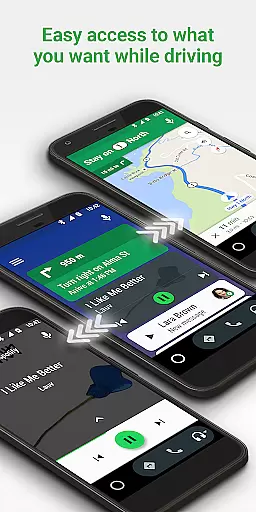
Android Auto is a sophisticated driving companion designed to keep drivers focused, connected, and entertained while on the road. By integrating with the Google Assistant, it offers a simplified interface with large buttons and powerful voice commands, making it safer and easier to access your favorite apps. This app is essential for modern vehicles, providing seamless connectivity between smartphones and car displays.
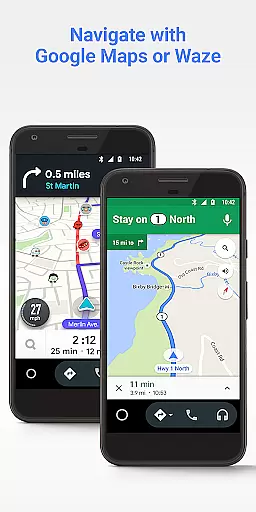
With features such as real-time GPS navigation via Google Maps or Waze, hands-free calling, and access to numerous entertainment and messaging apps, Android Auto enhances the driving experience. It allows users to manage their infotainment systems efficiently, ensuring minimal distractions. The app supports over 400 car models and requires a phone running Android 6.0 or higher, along with an active data connection.
Android Auto's value lies in its ability to provide real-time updates on routes, traffic, and hazards, while enabling users to interact with their devices safely. Whether it's checking your calendar, setting reminders, or enjoying music from popular streaming services, this app ensures that drivers remain engaged with their environment while staying connected to their digital lives.
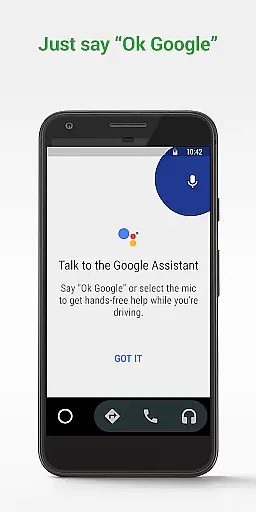
Android Auto boasts a range of features tailored to enhance the driving experience. One of its standout capabilities is the integration with the Google Assistant, allowing users to perform various tasks through simple voice commands. This includes navigating to destinations using Google Maps or Waze, receiving real-time updates on routes, ETAs, and potential hazards, and managing calls and messages without taking your eyes off the road.
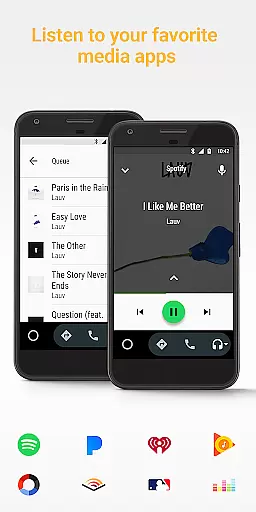
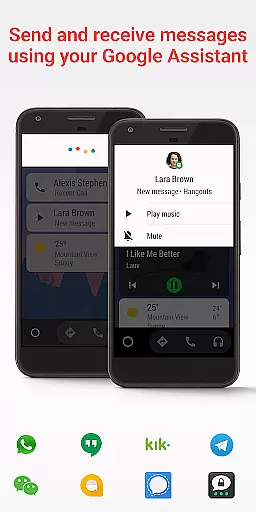
In addition to navigation and communication, Android Auto provides access to a multitude of entertainment options. Users can enjoy music, podcasts, audiobooks, and more from popular apps like Spotify, Pandora, and Google Play Music. The app also supports numerous messaging platforms, including SMS, WhatsApp, and Telegram, ensuring that users can stay in touch with friends and family safely. Furthermore, Android Auto's customizable interface adapts to different car displays, offering a consistent and user-friendly experience across over 400 compatible car models.
Another significant feature is the ability to set a custom 'do not disturb' message while driving, reducing distractions and promoting safer driving habits. With continuous updates and an expanding list of compatible apps, Android Auto remains at the forefront of in-car technology, providing drivers with a reliable and versatile tool to enhance their journeys.
Android Auto provides comprehensive vehicle information through its integration with compatible car models. This feature allows users to access crucial data such as engine performance, tire pressure, and fuel levels directly from the interface.
The application's design ensures that all vehicle information is presented in an easily digestible format, utilizing large buttons and simplified menus for quick access while driving. This minimizes distractions and helps drivers maintain focus on the road.
By leveraging real-time updates, Android Auto keeps drivers informed about their vehicle's status, offering notifications for maintenance needs or potential issues. This proactive approach aids in vehicle upkeep and safety.
Users benefit from having all essential vehicle data at their fingertips, allowing for informed decisions regarding maintenance and driving habits, ultimately enhancing the overall driving experience.
While Android Auto itself is a free application, price transparency becomes relevant when considering the cost of compatible apps and services it supports. The platform provides clear information about which apps are free and which require subscriptions or in-app purchases.
Through its compatibility with various music, navigation, and communication apps, Android Auto ensures that users are aware of any associated costs before accessing these services. This empowers users to make financially informed choices about which apps to use during their drives.
The application also supports different pricing models, including one-time purchases and subscription-based services, giving users flexibility in how they choose to access content. This variety caters to different preferences and budgets.
Overall, Android Auto promotes financial awareness by clearly displaying the costs associated with third-party apps, ensuring that users can enjoy their driving experience without unexpected expenses.
User-friendly interface
Voice command functionality
Wide app compatibility
Real-time navigation updates
Enhanced safety features
Limited to Android devices
Requires active data connection
Dependent on car compatibility
Occasional connectivity issues
Some features may need subscription

Monitor specific TOYOTA parameters by adding this plugin to Torque Pro.
 2.00
2.00
Practice the drills within MotoJitsu Master Riding Program Volume 1 & 2!
4.80
Wonder how much horsepower and torque your car/truck makes? Look no further.
3.40
Digital Car Key/Launcher, Screen Mirror, Android Dashboard, Remote Wireless Link
4.40
Blink Charging Mobile app makes finding an EV charger an intuitive experience.
3.80
By enthusiasts, for enthusiasts
4.00
Automotive Electrical Wiring Diagrams
4.40
Secure mobile payments & fuel savings at Phillips 66®, Conoco® and 76® stations
4.40
1M+ high-quality auto parts at your fingertips. Fitment guaranteed.
4.70
Find Your Local Store or Shop Online for the Car, Truck, or SUV Parts You Need
4.70
CVT diagnostics with ELM327 for Nissan-based vehicles
4.40
Your Path to Driving Licensing Success Begins Here! Develop your driving skills.
4.40
OBD2 car scanner and diagnostics: read Check Engine, DTC, economy....
4.30
Discover new and used cars in Syria easily! Browse ads and connect with sellers.
3.70
App Mirroring for Tesla Car's Browser
2.80


User Reviews