
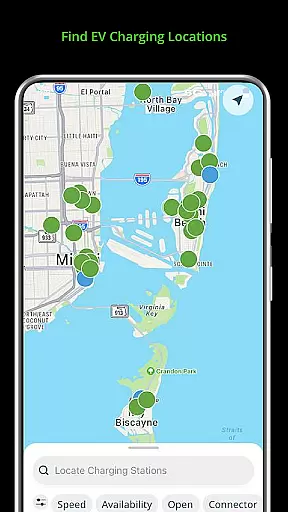
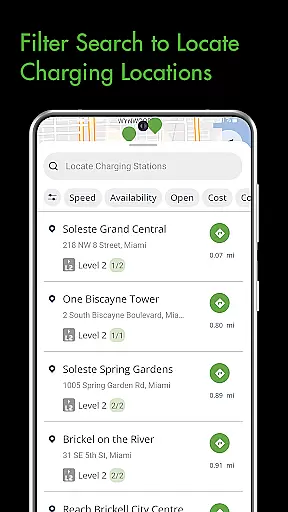
Blink Charging Mobile App is a comprehensive solution for electric vehicle (EV) owners, designed to make the charging process more convenient and efficient. The app allows users to locate EV charging stations easily by searching via zip code, city, business name, or physical address. It also provides real-time monitoring of charge sessions, including details like energy delivered and charging speed.
One of the standout features is the ability to manage home charging stations, specifically the HQ 200 model. Users can configure settings, track charging history, and manage sessions directly from their mobile devices. Additionally, the app supports an expanded network that includes SemaConnect stations, allowing for a broader range of charging options. This makes it an invaluable tool for EV drivers who need reliable access to charging stations both at home and on-the-go.
The Blink Charging Mobile App offers a variety of advanced features tailored to enhance the EV charging experience. One key feature is the ability to locate public EV charging stations effortlessly. Users can search for chargers based on various criteria such as location category or business name, ensuring they can always find a convenient charging point.
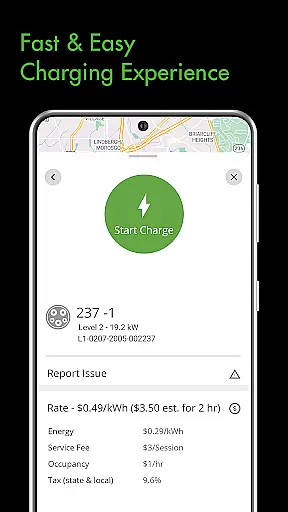
Another significant feature is the detailed management of charge sessions. The app provides real-time updates on charging status, estimated costs, and energy delivery. Users can also set up notifications for different charging statuses, keeping them informed throughout the process. Moreover, the app's support for managing home charging stations like the HQ 200 adds another layer of convenience, allowing users to control all aspects of their charging setup remotely.
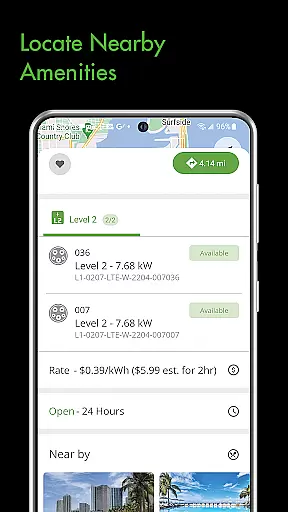
The Blink Charging Mobile App provides comprehensive details about electric vehicle charging stations, ensuring users have all the necessary information for a seamless charging experience. This includes specifics such as location, availability, and compatibility with different EV models.
Users can search for EV chargers by various parameters including zip code, city, business name, or physical address. The app's detailed station information helps drivers make informed decisions on the most suitable charging points for their needs.
In addition to locational data, the app offers real-time insights during charging sessions. Users can monitor energy delivered, charging speed, and estimated costs, which enhances the predictability and reliability of each charge session.
This level of detail ensures that EV owners can efficiently plan their charging stops, whether at home using the HQ 200 station or at public locations, optimizing both time and resources while maintaining their vehicle's performance.
One of the key features of the Blink Charging Mobile App is its commitment to price transparency, providing users with clear information regarding the costs associated with charging their electric vehicles. This empowers users to manage their expenses effectively.
The app displays estimated charging session costs upfront, allowing users to anticipate expenses before initiating a charge. Detailed breakdowns include occupancy time and energy delivered, ensuring customers understand what they are paying for.
Moreover, the integration with the Blink Network and SemaConnect stations extends this transparency across an expanded network. Users can access consistent pricing information regardless of the charging station brand, enhancing trust and reliability in the service.
By offering a transparent view of charging costs and payment management options within the app, Blink Charging ensures that EV drivers can enjoy a hassle-free experience without unexpected financial surprises.
User-friendly interface
Comprehensive charge session management
Supports multiple charging networks
Real-time charging updates
Home charging station integration
Limited to specific charger models
Occasional connectivity issues
Requires account registration
Some features are subscription-based
Not all chargers support remote management

The Smarter Way Forward
 3.30
3.30
Theme for Car Launcher
4.1
Read and delete OBD codes with any ELM327 OBD scanner. Coding functions included
3.40
Oil change service & coupons for car maintenance at Valvoline Instant Oil Change
4.70
Club Car Wash Mobile App—the fast lane to managing your wash membership.
3.30
The ExtraMile App allows you to pay for fuel from the comfort of your car!
4.70
Instant diesel savings. No credit checks or fees. Nationwide growing network.
4.40
Available in select states.
4.00
Easy connect & control your cars from afar. Remote Lock & unlock car and carplay
4.60
Car Values, Research and More
4.80
View your car’s service records and find out when maintenance is due.
4.70
DMV practice test 2025: Driver License permit test & written test for all states
4.70
Find Your Local Store or Shop Online for the Car, Truck, or SUV Parts You Need
4.70
Realtime Charts is a plugin for the Torque Pro App (OBD 2 & Car)
4.20
Theme for Car Launcher
4.5


User Reviews