
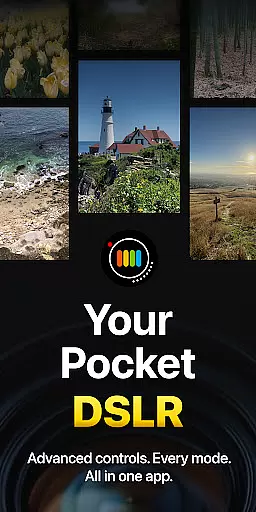
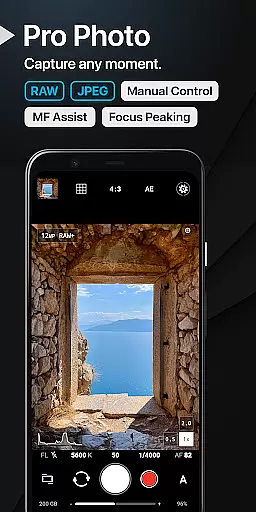
ProShot is a professional-grade photography and filmmaking application designed for Android users who demand full creative control over their mobile photography experience. This app offers an extensive range of manual controls akin to those found in DSLR cameras, including shutter speed, ISO, white balance, and exposure settings. With its intuitive interface and Dual Dial system, ProShot allows both amateur and professional photographers to capture high-quality images and videos with ease.
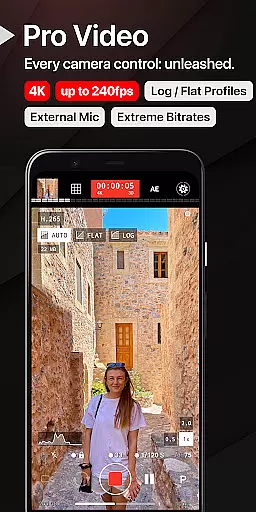
In addition to its robust photo capabilities, ProShot also excels in video production. The app supports resolutions up to 8K, LOG and FLAT color profiles for enhanced dynamic range, and real-time audio monitoring for external microphones. Whether capturing stills or recording cinematic footage, ProShot provides the tools necessary to produce stunning visual content directly from a smartphone.
The app's dedication to user privacy is another standout feature, as it does not collect, store, or transmit personal data. This ensures that all photos, videos, and related information remain secure on the user's device. Suitable for various scenarios, from casual snapshots to professional assignments, ProShot empowers creators to explore limitless photographic possibilities without compromising on quality or privacy.
ProShot distinguishes itself through a comprehensive suite of features tailored for discerning photographers and videographers. One of its hallmark attributes is the implementation of the camera2 API, which grants users unparalleled access to advanced camera functions typically reserved for professional equipment. Users can toggle between Auto, Program, Manual, and Custom modes, adjusting parameters such as ISO, shutter speed, and focus with precision.
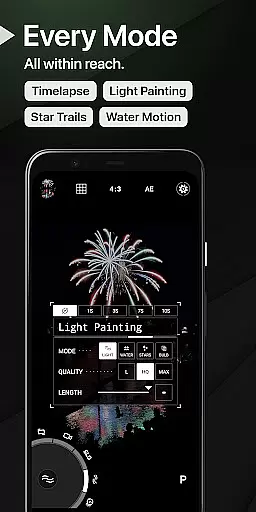
Beyond its core photographic functionalities, ProShot incorporates innovative tools like Light Painting modes for artistic long-exposure effects and Bulb mode for astrophotography enthusiasts. The app further enhances the creative process by offering customizable accent colors, zero-lag bracket exposure, and manual focus assist with focus peaking. These features collectively contribute to a personalized and seamless shooting experience.
For videographers, ProShot delivers equally impressive capabilities. It supports high frame rates up to 240 FPS, 'beyond 4K' resolutions on compatible devices, and industry-standard 180-degree rule options. Additionally, the ability to record while playing music from streaming services exemplifies the app's versatility. By providing these sophisticated features, ProShot positions itself as a premier choice for mobile content creation across diverse genres and styles.
Real-time capture and preview functionality is essential for photographers who need to see exactly what their camera is capturing. ProShot offers a seamless experience by providing users with an accurate representation of the scene before they take the shot. This ensures that every photo taken meets the high standards expected by professional photographers.
The app leverages advanced technology to minimize lag between the action and its display on the screen, allowing users to capture fleeting moments without delay. With ProShot's real-time capabilities, you can adjust settings like exposure, focus, and white balance while observing the changes instantly. This immediate feedback loop empowers photographers to fine-tune their shots until they achieve perfection.
Moreover, ProShot supports various formats including RAW (DNG), JPEG, or RAW+JPEG, giving photographers flexibility in post-processing. The ability to shoot in HEIC format on compatible devices further enhances storage efficiency without compromising image quality. These features combined make ProShot a powerful tool for capturing images with precision and confidence.
While ProShot does not specifically market itself as having AI beauty enhancements, it excels in offering natural-looking results through manual controls and sophisticated camera settings. Users have access to a plethora of options such as tone mapping, sharpness adjustments, and noise reduction, which allow for subtle yet effective enhancements that maintain the authenticity of the original image.
ProShot provides unparalleled control over the final look of your photos. By adjusting parameters like ISO, shutter speed, and white balance manually, users can create images that reflect their artistic vision without relying on artificial enhancements. The inclusion of light painting modes and bulb mode adds another layer of creativity, enabling long-exposure photography that captures stunning nightscapes and star trails naturally.
Furthermore, ProShotu2019s commitment to privacy means no personal data is harvested, ensuring that any enhancements made are solely based on user input rather than automated algorithms that might compromise the integrity of the image. This approach guarantees that each photograph retains its genuine character, making ProShot a trusted companion for photographers seeking natural beauty in their work.
User-friendly interface
Advanced manual controls
Privacy-focused design
High-resolution video support
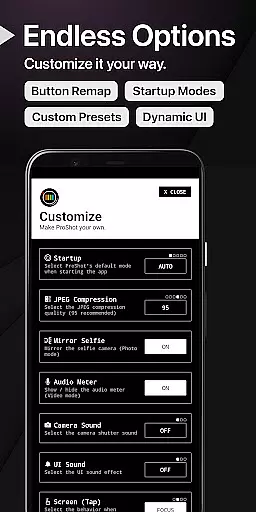
Customizable settings
Steep learning curve
Requires powerful hardware
Premium price point
Limited free features
Occasional performance issues

AI portrait generator and polaroid AI selfie, fun AI generated AI photo creator!
 4.30
4.30
Safe & smart flight with Go Fly drone controller for 40+ drone camera, zone map
4.50
Perfect body tune & face app - photo retouch, makeup, slim body & beautify face.
4.80
A must-have app for landscape photographers
4.60
Amazing Photo Effects - The most fun you can have with your photos!
4.70
Smart, light, and fast photo and video gallery
4.30
Easily create custom gifts, cards, photo books & more on the Shutterfly app!
4.60
live datamoshing
4.00
Solocator stamps photos you take with GPS location, Compass Direction, Date/Time
3.80
See your baby AI baby face generator AI baby maker Face generator babymaker fun!
4.70
AI photo editor with hair editor, retouch tools, hair color changer & filters!
4.50
AI photo enhancer with Sora 2! Enhance, descratch, and colorize your old photos.
4.50
Edit like a pro with Hypic. Apply filters, AI effects, & magic touch.
4.40
Perfect photos with body shaping, BG changer and object remover.
3.70
Remote control the phone camera shutter from your smartwatch and take a picture
1.60


User Reviews