


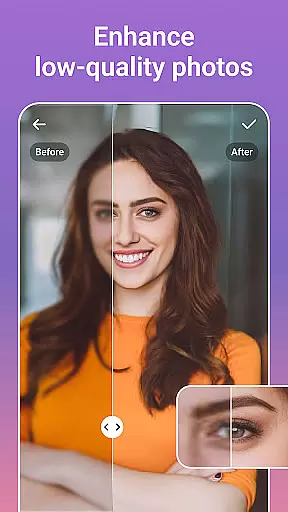




PicsLeap is an advanced AI-powered photo editing application that offers a comprehensive suite of tools for enhancing, transforming, and personalizing images. With features ranging from one-tap enhancements to complex double exposure effects, PicsLeap caters to both amateur photographers and professionals alike. The app's intuitive interface allows users to effortlessly apply 100+ filters and effects, including retro, film, and portrait styles, making it simple to embrace a signature look.
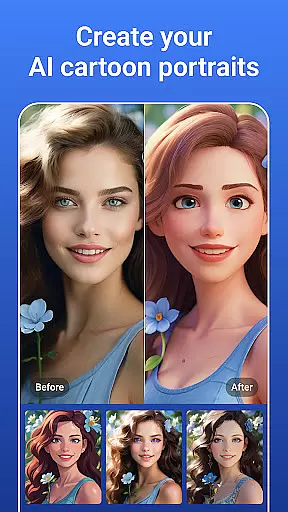
Beyond basic adjustments, PicsLeap provides sophisticated tools such as HSL, curve adjustments, and AI-driven functions like Magic Eraser and AI Face Swap. Users can also create stunning collages, remove unwanted objects, and even generate cartoon versions of their photos. Whether you're looking to restore old photographs or produce high-quality art for social media, PicsLeap delivers the tools necessary to bring your creative vision to life.
PicsLeap stands out with its extensive range of innovative features designed to meet diverse photo editing needs. One of the key highlights is the AI Remove Background tool, which intelligently isolates subjects from their backgrounds, allowing for seamless replacements with options like starry oceans or blooming gardens. The Magic Eraser function simplifies the process of removing unwanted elements while maintaining image integrity, ensuring professional-grade results without the need for specialized skills.
In addition to these powerful capabilities, PicsLeap offers creative tools such as Double Exposure effects, Blur background options, and a variety of stickers and text overlays. Users can experiment with over 70 light effects, including love, rainbow, and fog, to add unique touches to their images. The app also supports precise color adjustments through HSL, Highlight, and Split Tone controls, enabling detailed customization. With its user-friendly design and robust feature set, PicsLeap empowers creators to produce visually striking content with ease.
Real-time capture and preview functionality is essential for any photography app as it allows users to see exactly what they are capturing before taking the shot. PicsLeap offers a seamless experience with its advanced AI-powered real-time photo processing capabilities.
The app ensures that every adjustment, from filters to effects, is instantly visible in the camera preview. This empowers users to make informed decisions about their photography, ensuring that the final image matches their creative vision without the need for post-capture editing.
With PicsLeap's intuitive interface, users can experiment with different settings such as light effects, double exposure, and background blur. The immediate visual feedback provided by the app helps photographers of all levels refine their skills and capture stunning images effortlessly.
This feature not only enhances the user experience but also saves time, allowing creators to focus on their content rather than technical adjustments. PicsLeap's real-time capture and preview set a new standard for mobile photography apps.
AI beauty and enhancement features have become a staple in modern photo editing, offering users the ability to enhance their photos naturally without over-processing. PicsLeap stands out with its sophisticated AI algorithms that intelligently apply enhancements while maintaining the authenticity of the original image.
The app provides a suite of tools including One-Tap Enhance, Magic Eraser, and AI Face Swap, which work together to elevate photo quality. These tools ensure that skin tones remain true, details are preserved, and unwanted elements are removed seamlessly, resulting in professional-grade edits with minimal effort.
PicsLeap's AI-driven approach extends to its AI Cartoon Filters and AI Remove Background features, enabling users to explore creative avenues while retaining natural aesthetics. Whether transforming a portrait into a whimsical cartoon or isolating subjects against new backgrounds, the results are consistently impressive and lifelike.
By prioritizing natural enhancement, PicsLeap caters to both amateur and professional photographers who seek to enhance their images without compromising on realism. This commitment to quality makes PicsLeap an indispensable tool for anyone passionate about photography.
User-friendly interface
Extensive filter selection
Advanced AI tools
Versatile editing options
High-quality results
Occasional processing delays
Limited free features
Subscription required for premium
Ads in free version
Learning curve for beginners

All-in-One Editor & AI Photo Enhancer, Beautify & Retouch, Collage, Cartoonify
 4.20
4.20
Create AI Photos, Improve and restore quality of blurry, old or damaged pics.
4.20
Superimpose one photo on top of another using the original Superimpose app!
3.20
Automatically backup your photos and videos to computer, NAS and Cloud services
4.60
AI photo enhancer with Sora 2! Enhance, descratch, and colorize your old photos.
4.50
AI-powered video creator by MiniMax - Where ideas meet cinema
4.20
Hair color changer, AI haircut app, fun hair editor and buzz cut filter for all!
3.80
Pro version: AR sun/moon tracker for any date. Tool for photographers & planners
4.90
Catch sunlight, sunrise sunset times and sun phases with the AR sun tracker.
4.10
See your baby AI baby face generator AI baby maker Face generator babymaker fun!
4.70
Effortlessly organize, view and share your photos & videos with Gallery app!
4.40
Future baby face generator: AI kids generator, kid face! What my baby look like?
4.40
Shooting photos and records video easily and efficient with professional Camera
4.30
Natural Beauty, Selfie Retouch
4.30
How would you look like with a differently shaped nose, chin or lips?
3.90


User Reviews