
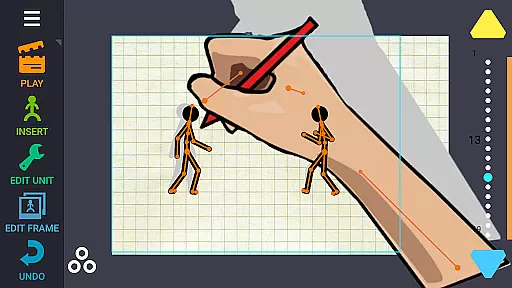
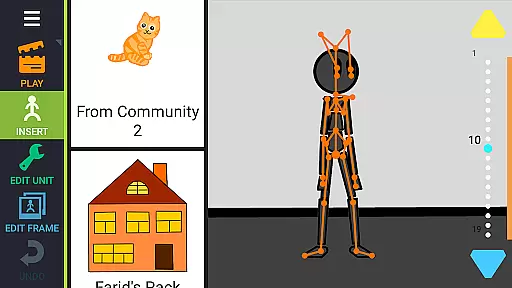
Draw Cartoons 2 PRO is a comprehensive 2D animation application designed for both beginners and advanced animators. The app simplifies the complex process of cartoon creation through innovative motion smoothing techniques, allowing users to set only the start and end positions of characters while the program generates smooth transitions.
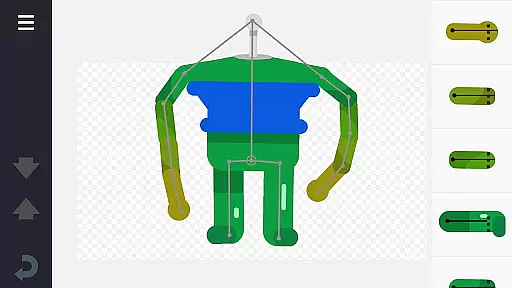
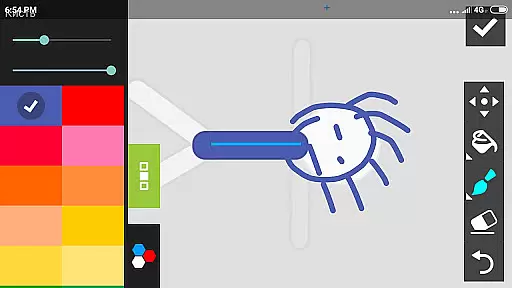
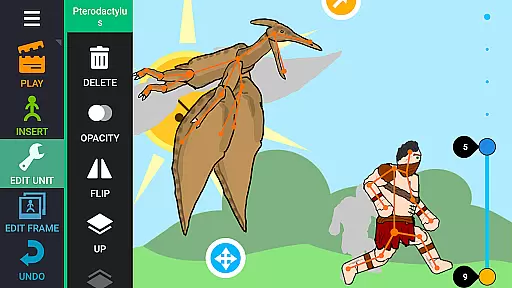
The app features an extensive library of pre-made characters and objects, including dragons, people, cars, and more. Additionally, it offers a character editor that enables users to create custom creatures and objects using 'bones'. Users can draw bones directly within the app or cut pictures from photos to incorporate into their animations.
With advanced tools like dramatic camera close-ups, speed effects for slow-motion or fast-paced scenes, and the ability to add music or voiceovers, Draw Cartoons 2 PRO provides everything needed to produce professional-quality cartoons. Animations can be exported as MP4 videos or GIFs and shared on platforms like YouTube using the tag #drawingcartoons2.
Draw Cartoons 2 PRO stands out with its unique combination of user-friendly features and advanced animation tools. One of its key features is the motion smoothing technique, which significantly reduces the complexity of animating by automatically generating smooth transitions between keyframes.
The app includes a vast library of ready-to-use characters and objects, making it easy to start creating animations immediately. For those seeking more customization, the character editor allows users to design their own creations by assembling 'bones' into complex structures. This flexibility extends to importing external images, enabling users to incorporate personal artwork into their projects.
Advanced animators will appreciate the inclusion of professional-grade tools such as dramatic camera angles for intense close-ups, speed effects to manipulate time in specific scenes, and audio integration for adding music or voiceovers. These features collectively empower users to craft intricate and engaging animations that rival professional productions.
In Draw Cartoons 2 PRO, the suite of creative tools is extensive and versatile. The application provides a comprehensive library of characters and objects, including dragons, people, cars, and much more, all at your disposal for crafting unique animations.
With the character editor, users can assemble creatures and objects from 'bones,' which serve as the building blocks for each animated figure. This feature allows for an impressive level of customization, enabling animators to draw bones directly within the app or cut them out from photos, thus offering endless possibilities for creativity.
Beyond basic animation, the app includes advanced features such as dramatic camera angles for those intense close-ups reminiscent of horror films, and speed effects that allow for slowing down or speeding up individual fragments, perfect for creating dynamic scenes like dodging bullets in slow motion.
The canvas and format flexibility in Draw Cartoons 2 PRO empowers animators with remarkable freedom. Users can create full-fledged 2D cartoons by simply setting start and end positions for characters, letting the program generate smooth transitions.
Animations are not limited to silent visuals; creators have the option to add music or voiceovers to their cartoons, enriching the storytelling experience. Finished projects can be exported in various formats, ensuring compatibility and ease of sharing.
Artists can save their creations as videos in MP4 format or as GIFs, ready to be uploaded to platforms like YouTube using the tag #drawingcartoons2 to connect with a community of fellow animators. Additionally, individual items can be saved and shared as separate files, promoting collaboration and the exchange of original content within the animator community.
User-friendly interface
Extensive library of assets
Powerful character editor
Advanced animation tools
Active community support
Steep learning curve
Requires significant storage
Limited free content
Premium subscription cost
Occasional bugs

Pose and morph realistic male and female models! 3D poser app
 3.00
3.00
Nano Banana AI Image Generator, Anime Filter, AI Portrait, AI Photo Generator
4.30
The perfect place to start sketching! Use Sketchbook to draw and paint sketches.
4.50
AR Anime Drawing: How to draw anime with AR drawing & sketching apps!
4.00
Novices can also easily complete diamond painting masters
4.70
Image resizer to resize, crop, rotate, flip, change dpi photo or picture in bulk
4.60
Everything you need to create hand drawn animation, anywhere you go!
4.40
Share the joy of painting with ibis Paint! Drawing anime and manga art.
4.50
Draw, fidget, and spin glow art! Relax and express your creativity with a finger
4.60
Unleash your drawing and painting potential
4.50
AI generated images & photos, turn your words into drawing, painting & pictures.
4.30
Unleash Your Creativity with Draw Cartoon - AR Drawing App
4.10
Experience next-gen icons with a modern liquid glass look.
3.60
Premium version of Shimeji-ee app with no ads & no limit active shimeji
4.2
Art of Combination Wear OS Watch faces
4.2


User Reviews