
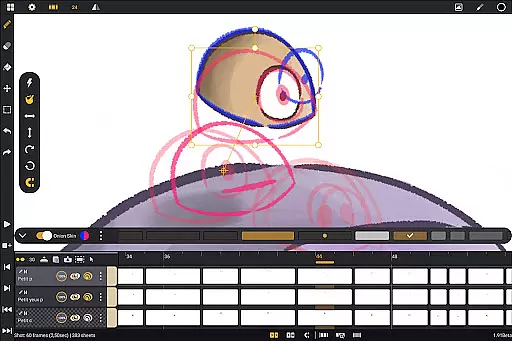
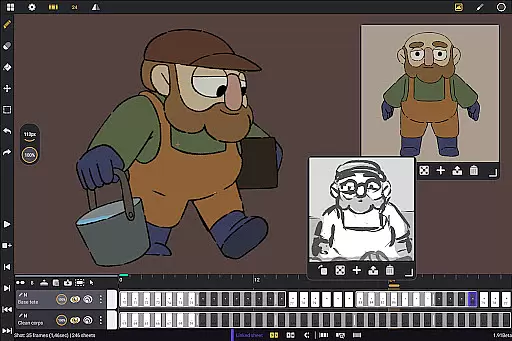
Callipeg is a professional-grade 2D hand-drawn animation application tailored for both seasoned animators and beginners. It transforms Android tablets into powerful animation studios by offering essential tools like studio-like organization, adjustable frame rates, and unlimited layer support. The app supports stylus input, making it ideal for artists who value precision and natural drawing experiences.
With features such as onion skinning, comprehensive drawing tools, and customizable workspaces, Callipeg ensures an efficient and flexible animation workflow. Animators can export their projects in multiple formats including .mp4, .gif, and .psd, maintaining industry-standard quality. Whether creating storyboards, frame-by-frame animations, or complete shots, Callipeg provides the necessary environment to produce professional-quality work on the go.
Callipeg stands out with its robust feature set designed for professional animators. The app offers studio-like organization where users can arrange shots, apply color tags, and manage assets effectively through drag-and-drop functionality. Its large canvas supports up to 4K resolution and adjustable frame rates of 12, 24, 25, 30, or 60 frames per second, catering to diverse animation styles.
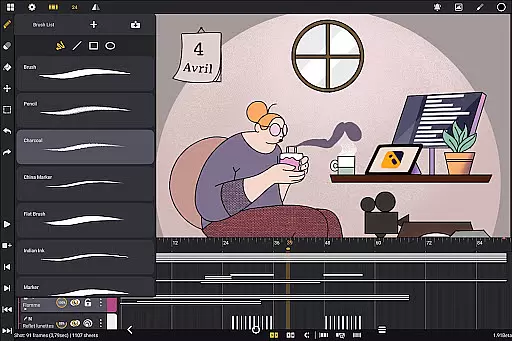
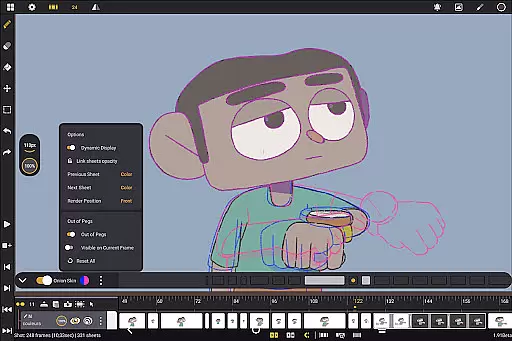
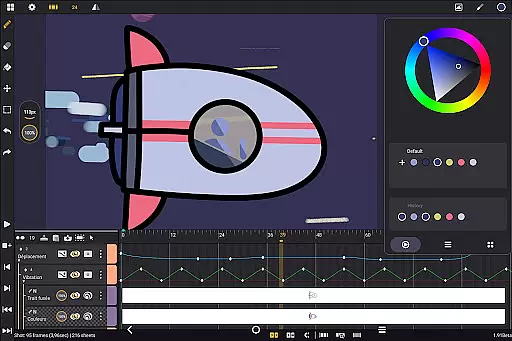
The app provides unlimited layer support, allowing animators to add various types of layers such as drawing, video, transformation, audio, or group layers. Comprehensive drawing tools include customizable brushes like pencil, charcoal, and ink, along with advanced color management options. Onion skinning displays up to eight frames with adjustable opacity, streamlining the animation process. Additionally, Callipeg's flexible import and export options enable seamless project transfer across different software platforms.
In the realm of digital art and animation, having a comprehensive set of creative tools is essential for bringing ideas to life. Callipeg offers an extensive suite of features that cater to both professional animators and beginners alike. The app provides users with a versatile brush set including pencil, charcoal, ink, and more, allowing for diverse artistic expressions. Each brush can be customized in terms of smoothing, tip shape, and texture, ensuring that artists can fine-tune their tools to match their unique style.
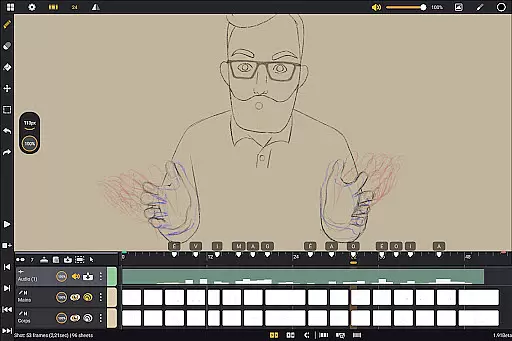
Moreover, Callipeg supports unlimited layers of various types such as drawing, video, transformation, audio, or group layers. This flexibility enables creators to import images, video clips, and audio files for advanced techniques like rotoscopy or lip-syncing. With support for adjustable frame rates and canvas sizes up to 4K resolution, the app meets industry standards while offering users the ability to produce high-quality animations directly on their Android devices.
The inclusion of studio-like organization features further enhances the creative process by allowing users to arrange shots through drag-and-drop actions, organize them into scenes and folders, and apply color tags and filters for efficient asset management. Such robust organizational capabilities ensure that artists can focus on their work without being hindered by clutter or disarray.
Flexibility in canvas size and format compatibility is crucial for artists who need to adapt their work across different mediums and resolutions. Callipeg addresses this need by providing a large canvas option that supports up to 4K resolution, catering to professionals who require high-definition outputs for feature-quality shots or detailed illustrations. This expansive canvas size allows creators to work with precision and clarity, ensuring that every detail of their artwork is captured accurately.
In addition to its impressive canvas capabilities, Callipeg also excels in format flexibility. Users can export their animations in multiple formats such as .mp4, .gif, .png, .tga, .psd, and .peg. This versatility ensures that finished projects can be shared or integrated into various platforms and workflows seamlessly. Furthermore, the ability to import and export project files in .json, .xdts, and .oca formats maintains timing and layer structure, facilitating collaboration with industry-standard software.
To complement its flexible canvas and format options, Callipeg offers a customizable workspace where sidebars can be positioned as preferred, reference images imported without limit, and the canvas inverted to check proportions. These features empower artists to tailor their working environment according to their specific needs and preferences, enhancing both comfort and productivity during long creative sessions.
User-friendly interface
Highly customizable workspace
Unlimited layer support
Professional-grade tools
One-time purchase model
Limited to Android devices
Stylus-dependent features
No iOS version available
Advanced learning curve
Occasional performance issues

AI Face Swap, Video Effects Editor, Realtime Morph, Funny Video FX,AI Filters
 3.70
3.70
Logo Generator powered by AI: Create stunning logos effortlessly!
4.70
Create color palette from Image, RGB & RYB Color wheel harmonies, Color Scheme
4.50
Passport size photo maker, create ID photo and visa photo in seconds
4.80
Make your phone cooler and have a fantastic experience
4.80
Create stunning art with AI.
4.80
Retouch photos. Create or edit images. Endless capabilities.
2.70
Explore future self face age filter & remove background image for a unique look.
3.50
Multiplayer Drawing game, Coloring, Painting・Sketch, Handwriting・Paint, draw
4.30
Draw on screen: FP sDraw is a simple and lightweight drawing app
4.70
Turn your drawings into flipbook-style animations with simple creative tools
4.60
Create Logos, Tattoos, AI Art & more with our AI Photo Generator & Design Editor
4.20
Sketch, trace and master AR drawing with awesome anime art!
3.30
Create stunning video, photo & magic from text with FlixAI GPT video generator.
3.10
Art of Combination Wear OS Watch faces
4.5


User Reviews