
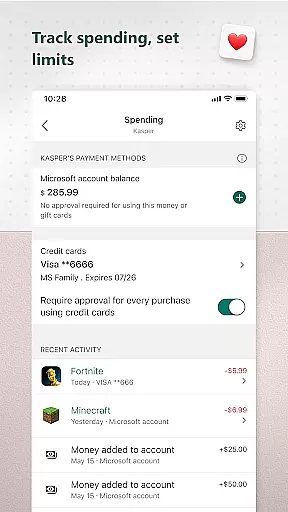
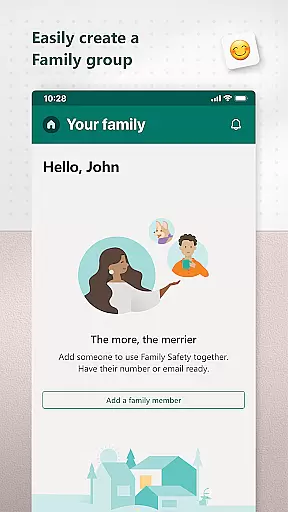
Microsoft Family Safety is a comprehensive parenting app designed to help families develop healthy digital habits while ensuring children's safety online. The app allows parents to set up parental controls, manage screen time, and filter inappropriate content across multiple devices including Android, Xbox, and Windows.
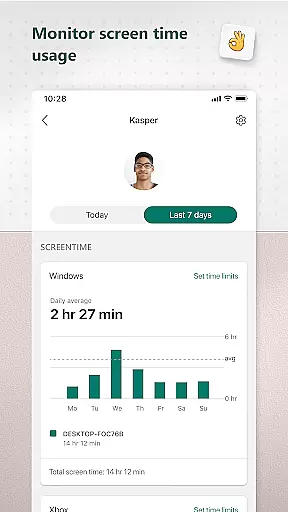
A key feature of the app is its activity reporting system, which provides parents with detailed insights into their children's digital activities through weekly email summaries. This helps facilitate meaningful conversations about responsible device usage. For kids, the app creates a safe digital environment where they can explore age-appropriate content while learning independence within set boundaries.
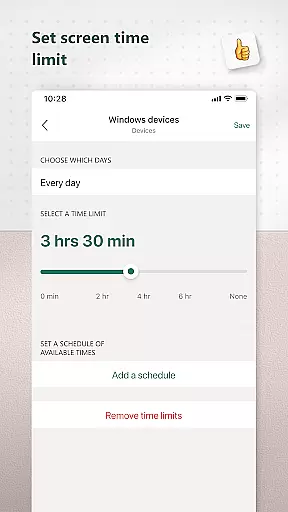
The app's value extends beyond just monitoring - it promotes balanced screen time through customizable app and game limits, enables kid-friendly web browsing on Microsoft Edge, and offers real-time notifications when children request additional usage time. This makes it an essential tool for modern families navigating the digital world.
Microsoft Family Safety stands out with its robust set of features designed to give parents complete control over their children's digital experiences. The app's activity reporting feature tracks screen time and online usage patterns, delivering detailed weekly summaries directly to parents' email inboxes.
Screen time management capabilities are particularly impressive, allowing parents to set specific time limits for individual apps and games across multiple platforms. The app also enables device-level time restrictions for Xbox and Windows devices, with instant notifications when children request extensions. Content filtering features work seamlessly with Microsoft Edge to block inappropriate websites and applications, ensuring a safer browsing experience.
What sets this app apart is its sophisticated permission system that operates through accessibility services and device admin permissions. This allows for real-time app monitoring and blocking capabilities while maintaining transparency through clear privacy policies and user consent protocols.
When it comes to parenting applications, the credibility of content and expert validation are paramount. Microsoft Family Safety stands out in this aspect by providing features that are designed and endorsed by child safety experts. The app offers activity reports that help parents understand their children's digital habits through detailed logs of screen time and online usage.
The application enables parents to set appropriate limits for app and game usage across multiple devices including Xbox, Windows, and Android platforms. These parental controls have been carefully crafted based on expert recommendations to ensure they promote healthy digital habits without being overly restrictive. This balance is crucial for fostering an environment where children can learn and grow safely.
Moreover, the content filters available within Microsoft Family Safety adhere to strict standards for age-appropriate material. By blocking inappropriate apps and games and enabling kid-friendly browsing on Microsoft Edge, the app ensures that children only access vetted and safe content. This level of expert-validated filtering provides peace of mind to parents who want to protect their kids from potentially harmful online experiences.
Growth tracking in the digital context refers to monitoring a child's development through their online activities and screen time habits. Microsoft Family Safety excels in this area by offering precise tools that allow parents to track their children's growth in terms of digital literacy and responsibility. Through weekly email summaries, parents receive comprehensive reports about their kids' app usage and browsing patterns.
This feature not only tracks but also encourages open conversations between parents and children regarding online behavior. With accurate data at hand, parents can discuss real examples with their kids, helping them understand the importance of balancing digital entertainment with educational content. Such discussions foster a sense of accountability in young users as they become more aware of how they spend their time online.
In addition to tracking, Microsoft Family Safety provides notifications when children request additional screen time or attempt to access restricted content. This immediate feedback loop allows for timely interventions that guide children towards making better decisions independently. As kids learn to manage their own screen time within set boundaries, they develop essential skills for self-regulation which contribute significantly to their overall growth trajectory.
Comprehensive cross-platform support
Detailed activity reporting
Real-time usage alerts
Customizable content filters
Weekly summary emails
Requires multiple permissions
Limited third-party app control
Complex setup process
Some features Android-only
Dependent on Microsoft ecosystem

Discover fun videos, kids songs, bedtime stories and games
 3.60
3.60
Little loved one's monitoring, Sleep tracking and Parenting content.
3.80
Play activities, milestones, expert-led classes, baby tracker, and more!
3.00
Watching baby, helping parents
4.10
It is a screen time management tool for games and mobile applications
4.50
Pinardin - Smart Parental Control, Online Safety & GPS Tracking!
4.80
Lullabies, Night Light & Age-based Routines to help your baby fall asleep
4.0
Parental control App for Location, Remote Camera, Screen Mirroring, Block Apps.
4.60
Screen Time, App and Web Block & Monitoring, Location Tracker
3.60
Sleep better with white noise app! Discover rain sounds, fan noise and more.
4.70
Track your pregnancy, kick & contraction counter, baby & mom's heartrate monitor
4.60
GPS tracker app: Simple GPS phone tracker for fast family location tracking
4.60
Learn according to the age of your child and consult with other moms.
4.20
Save money on diapers. Get the Pampers Rewards app.
3.90
Track pregnancy health and wellness with pregnant tracker from healthcare advice
4.2


User Reviews