
Lithium Pro is a premium upgrade for the Lithium app, designed to enhance your reading experience. This app unlocks advanced features in the free version, offering users extended capabilities for managing their digital library.
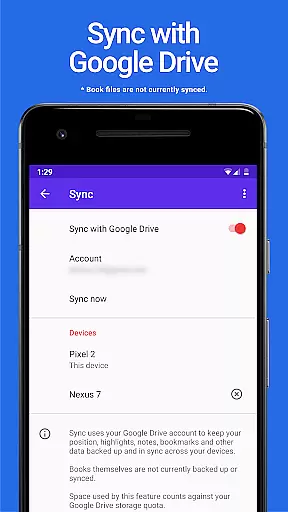
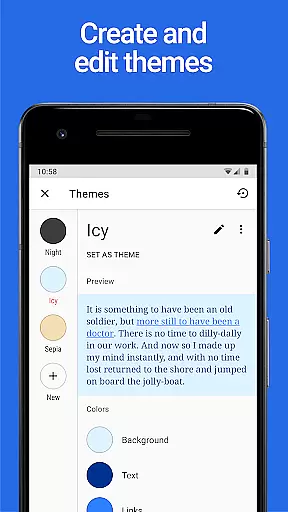
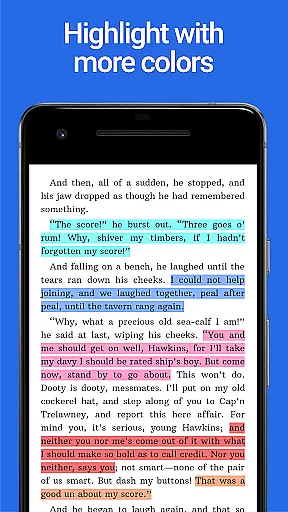
Key functionalities include cloud synchronization through Google Drive, custom themes for personalized display settings, and additional highlight colors for better content annotation. These features make it an ideal choice for avid readers who value customization and data security.
The application is particularly useful for users who read across multiple devices, ensuring seamless access to their library and consistent reading preferences wherever they go.
Lithium Pro offers a range of powerful features that significantly improve the reading experience. The most notable is the Sync functionality, which uses Google Drive to maintain backup and synchronization of user data across all devices.
Another standout feature is the custom themes option. Users can personalize their reading interface by adjusting background, text, and link colors. This level of customization allows for optimal readability and comfort during extended reading sessions.
The app also provides additional highlight colors beyond the standard options available in the free version. These enhanced annotation tools enable more sophisticated content organization and analysis.
When it comes to digital reading, the size and authenticity of an e-book library are crucial factors for avid readers. Lithium Pro understands this need and offers a seamless solution through its advanced Sync feature. While the app itself does not store books directly, it ensures that your reading data is consistently backed up and synchronized across all your devices via Google Drive.
This synchronization capability guarantees that users can access their entire e-book collection regardless of the device they are using. Although the application focuses primarily on data sync rather than book storage, this feature provides a reliable way to maintain a comprehensive digital library. The use of Google Drive for data backup gives users peace of mind knowing their reading progress and preferences are safely stored.
While Lithium Pro doesn't directly address copyright issues, its integration with the free version of Lithium creates a robust ecosystem for managing legitimate e-book content. By activating Pro features in the free app, users gain access to enhanced library management tools that help maintain a well-organized collection of legally acquired e-books.
Format compatibility is a vital aspect of any e-reading application, determining how well it can handle different file types and display them accurately. Lithium Pro excels in this area by offering extensive customization options that enhance the reading experience across various formats. Through its custom themes feature, users can personalize their reading environment to suit different document types and personal preferences.
The application allows users to modify page background colors, text colors, and link colors, creating optimal viewing conditions for different file formats. This level of customization ensures that whether you're reading PDFs, EPUBs, or other supported formats, the text will always be displayed in the most readable and comfortable way possible. The ability to create, delete, and edit multiple themes adds another layer of flexibility to format handling.
Additionally, Lithium Pro's enhanced highlight colors provide better annotation capabilities across different document types. This feature set, combined with the promise of future enhancements, demonstrates the application's commitment to maintaining broad format compatibility while continuously improving the reading experience for various file types.
Enhanced sync
Custom themes
More highlight colors
Future features
Google Drive integration
No book backup
Separate install
Pro only
Costly
Limited support

University of North Carolina Herbarium presents the flora of TN, AL, & MS.
 4.5
4.5
Improve your vocabulary and grammar with the 15 biggest Oxford Dictionaries.
4.30
Learn Electricians' Handbook PRO complete guide beginners to advance.
4.40
"When tweetle beetles fight, it's called a tweetle beetle battle."
4.90
Daily Prayer, personalized Bible Study, AI-guided Insights, and Spiritual Growth
4.80
Research your family history to explore ancestors and search for your heritage
4.50
Watch real short episodes in just minutes— addictive, you won't be able to stop!
4.70
Read Trending Romance Stories
4.00
Enjoy daily devotionals, Bible verses, audio courses, and more.
4.80
A KJV Bible with Apocrypha and precept-based study concordance
5.00
Read books PDF, EPUB, WORD, KINDLE, MOBI! Your ebook reader among reading apps.
4.80
A lightweight reader for comics and mangas files (.cbr, .cbz, .cbt, .pdf, ...)
4.80
Unlock unlimited access to bestselling ebooks, novels, stories, and audiobooks
4.60
Shop over 13 million new and used books at up to 80% off list price
4.20
Read popular romance books and web novels on the fantastic ebook reader
3.50


User Reviews